

If you're evaluating Chattermill alternatives, the hard part isn't finding tools. It's figuring out which ones give you signals you can actually defend in a room full of support, product, and finance leaders.
Most teams start with feature checklists. Then they realize too late that support analytics tools split into very different camps: broad VoC platforms, support ops tools, QA and coaching systems, and a smaller set built around ticket-level evidence rather than summary scores.
What Buyers Should Compare Beyond Chattermill
The right Chattermill alternative depends less on AI branding and more on the kind of evidence your team needs to act. Some tools are built for omnichannel VoC rollups, some for queue operations, and some for support conversation analytics with deeper ticket-level drill-downs. That difference drives the whole buying decision.
A CX lead reviewing survey themes has a different job from a support ops leader trying to catch escalation patterns by Tuesday morning. Same category on paper. Very different day-to-day reality.
Picture a support ops manager at 8:15 a.m., already in Zendesk, already behind. There are 1,200 open tickets, a spike in billing complaints, and three people in Slack arguing about whether the issue is real or just noisy sampling. If the tool only gives a dashboard tile and no path back to the actual conversations, the meeting turns into guesswork. That's usually where these evaluations go sideways.
[Table: Tool] — See "Table Embed Codes" in Oleno to copy the HTML for this table.
Key Takeaways:
- qvasa is the narrowest option, but for Zendesk queue monitoring it can be the fastest fit.
- SentiSum and SupportLogic go deeper into support-specific workflows than Chattermill, especially when churn or escalation risk matters.
- Thematic is often a better fit for research-heavy CX teams that care about taxonomy governance and analyst control.
- Siena solves a different problem: automation and deflection, not deep support conversation analytics.
- The buying mistake is comparing all of these as if they were interchangeable VoC platforms.
Why Choosing a Chattermill Alternative Is Harder Than It Looks
Choosing a Chattermill alternative gets messy because buyers often compare tools across the wrong dimensions. The real split is between score aggregation, operational monitoring, and evidence-backed support analytics. Miss that, and you buy a polished dashboard that doesn't answer your actual question.

Chattermill fits well when the job is broad Voice of the Customer analysis across channels, especially for CX and insights teams that want centralized feedback trends, theme discovery, and executive reporting (Chattermill VoC program guide). Their product updates also point to ongoing investment in AI and feedback analysis workflows (Chattermill product updates).
But the limitations show up fast when your center of gravity is support tickets. Support leaders don't just need themes. They need to know which issue is rising, which segment is affected, what conversations support it, and whether the pattern is strong enough to justify action. Scores alone rarely settle that.
I think this is the cleanest test: if your team asks "what changed?" more than "how are we trending?", you probably need a support-native analytics workflow, not just a broad VoC layer. Call it the Evidence Threshold Rule. If a weekly decision needs three or more ticket examples attached to it before product takes it seriously, evidence depth matters more than dashboard breadth.
There's a fair case for broad VoC platforms. If you're pulling in reviews, surveys, social, and support all at once, Chattermill's wider frame can make sense. But that same breadth can blur the support-specific detail that operations teams need. That's the tradeoff. Coverage across channels versus depth inside the ticket stream.
A lot of buyers also underestimate deployment shape. One tool might be perfect if you live inside Zendesk. Another might shine only when you have a research team curating taxonomy every week. Another starts earning its keep only once you have 100-plus agents and a formal QA motion. Different maturity stages. Different economics. Different pain.
So what should you actually compare?
What to compare across support analytics tools
Seven criteria usually decide the winner. Not twenty. Seven.
First, check coverage. If the platform relies on sampling or partial review, you need to know the cutoff. A simple rule works here: if your team handles more than 1,000 monthly conversations, anything below full or near-full analysis creates blind spots that compound fast.
Second, check traceability. Can you click from a metric to the underlying tickets? If not, you're buying summary without proof.
Third, separate drivers from scores. Sentiment by itself is thin. Drivers, effort, churn risk, escalation patterns, and root-cause groupings are what move prioritization.
Fourth, look at workflow fit:
- Zendesk-native ops monitoring
- Omnichannel VoC reporting
- QA and coaching
- Ticket-level analytics for CX, product, and ops
Fifth, test deployment friction. Some tools need real setup discipline, taxonomy work, or enterprise process maturity before they become useful.
Sixth, price transparency matters more than vendors like to admit. If you can't ballpark year-one cost during evaluation, budgeting gets political.
Seventh, check whether the output is usable by more than one team. Support alone rarely owns the budget for these tools.
That list sounds obvious. Nobody's checking it in order, though. That's why good evaluations still end in bad purchases.
1. qvasa
qvasa is a Zendesk-focused operations layer, not a broad VoC platform. It makes the most sense for teams that need live queue visibility, issue spikes, and alerting inside a Zendesk-heavy workflow. Compared with Chattermill, it goes narrower and more operational.
A support lead with 30 agents doesn't always need an enterprise feedback program. Sometimes they need to know, right now, whether first-response time is breaking for one queue and whether a billing issue just blew up overnight. That's the lane qvasa appears built for, based on the market grid in the brief.
qvasa's appeal is pretty simple. If your world already runs through Zendesk and you care more about operational visibility than cross-channel CX analysis, narrower can actually be better. Same thing with buyers who don't want to fund a large VoC motion just to catch queue anomalies.
qvasa at a glance
qvasa is built for Zendesk-centric teams that want speed and operational focus. Its value is real-time monitoring rather than broad customer feedback intelligence. That makes it a sharper choice for queue health than for executive VoC storytelling.
From the competitive grid, qvasa is positioned around deep Zendesk integration, issue alerting, and real-time dashboards. The tradeoff is equally clear: narrow scope, less public documentation, and a thinner fit outside Zendesk-native environments.
Key points buyers should weigh:
- Zendesk-centric workflow
- Real-time operational monitoring
- Freemium entry point
- Strong fit for issue spikes and alerting
- Limited breadth for omnichannel VoC work
Pricing summary: Freemium, with a free tier listed in the competitive grid.
Pros:
- Good fit for support operations leaders who live in Zendesk
- Faster path to queue visibility than broader VoC platforms
- Useful when emerging issue detection matters more than taxonomy governance
Cons:
- Narrow use case outside Zendesk
- Less suited to research or executive VoC rollups
- Evidence depth appears thinner than tools built around ticket-level analytics
Best for: Support operations leaders prioritizing queue visibility, contact drivers, and emerging issue detection in Zendesk.
How Revelir AI is Different: qvasa is built around operational visibility in Zendesk. Revelir AI is a stronger fit when the question shifts from "what's happening in the queue?" to "what do 100% of these tickets actually say, what drivers sit underneath them, and which exact conversations support the pattern?"
2. SentiSum
SentiSum is one of the more support-centric Chattermill alternatives. It leans into automated ticket tagging, trend detection, and churn-oriented signals, which makes it a stronger fit for support organizations than broad VoC platforms in many cases. Compared with Chattermill, it's closer to the support floor.
That matters when the problem isn't annual VoC reporting. It's this week. Your team sees churn risk rising in one segment, nobody agrees on the root cause, and manual review is too slow to settle it.
SentiSum has publicly framed itself around alternatives and support analytics use cases, including pages discussing competitive positioning and support-led analysis (SentiSum library, SentiSum Medallia alternative). Public market comparisons also place it in the support analytics camp with real-time churn detection and natural language assistance.
SentiSum at a glance
SentiSum fits teams that need support analytics with stronger operational context than Chattermill usually emphasizes. Its support-specific workflows, automated tagging, and churn-related signals make it more attractive for subscription businesses managing large ticket volumes. That fit is strongest when support data drives product and retention decisions.
There is a downside. Public market comparisons often place starting price around $3,000+/month, which immediately changes the buying conversation for mid-market teams.
What stands out:
- Automated tagging and theming
- Support-led trend detection
- Churn-risk surfacing
- Mid-market to enterprise orientation
- Broader support workflow fit than generic VoC tools
Pricing summary: Subscription, with starting price around $3,000+/month in public market comparisons.
Pros:
- Strong support-operations angle
- Better fit than Chattermill for ticket-centric churn and root-cause work
- Useful for support leaders who need more than dashboard-level sentiment
Cons:
- Higher starting cost
- Initial setup can be more involved
- May feel heavy for small teams with light ticket volume
Best for: Support operations leaders and CX teams in subscription businesses that need churn detection, ticket analytics, and support-specific workflows.
How Revelir AI is Different: SentiSum is built for support analytics, but Revelir AI leans harder into evidence-backed traceability. If your team needs every grouped insight to resolve back to source tickets, plus custom AI metrics and structured exploration through Data Explorer, the workflow is different in a useful way.
3. SupportLogic
SupportLogic is built for enterprise support execution, not just analytics. It stands out when predictive escalation, QA automation, and agent coaching are part of the brief. Compared with Chattermill, it goes deeper into how large support organizations run.
This is where category confusion gets expensive. A VP of Support with 150 agents and a formal QA function is not buying the same thing as a CX leader building executive feedback reporting. Let's pretend they are, and suddenly every demo looks similar. It isn't.
SupportLogic publicly emphasizes its support data cloud and future-facing knowledge and intelligence workflows (SupportLogic Data Cloud, SupportLogic event page). Public market comparisons often position it around predictive detection, QA, coaching, and enterprise-grade support intelligence.
SupportLogic at a glance
SupportLogic is a strong fit for large enterprise support organizations with complex case workflows and mature support leadership. Its value comes from predictive support intelligence plus QA and coaching capabilities. That makes it meaningfully different from Chattermill's broader VoC orientation.
Buyers should go in clear-eyed, though. The same enterprise depth that makes SupportLogic attractive also raises cost and deployment complexity.
What to know:
- Predictive escalation and churn-style signals
- QA automation and coaching workflows
- Cross-system support intelligence
- Enterprise support focus
- Built for mature support organizations
Pricing summary: Hybrid pricing, with public market comparisons estimating around $3,000+/month.
Pros:
- Strong fit for enterprise support organizations
- Deeper operational support tooling than Chattermill
- Good alignment for QA-heavy teams
Cons:
- High cost
- More implementation work
- Overbuilt for smaller or less mature support teams
Best for: Enterprise support organizations that prioritize QA automation, agent coaching, predictive escalation detection, and support execution.
How Revelir AI is Different: SupportLogic centers more of the product around QA and coaching. Revelir AI is a cleaner fit when the job is extracting insight from historical and ongoing tickets, validating patterns at the conversation level, and turning raw support data into structured metrics without making QA scorecards the main event.
4. Siena (Idiomatic)
Siena is primarily an AI support automation product for ecommerce, not a pure support analytics platform. It makes sense when ticket deflection, returns workflows, and brand-safe automated responses matter more than deep ticket analysis. Compared with Chattermill, it solves a different problem entirely.
That's an important concession. Automation can be the right priority. If an ecommerce team is drowning in repetitive order-status, refund, and return conversations, a better analytics layer won't help as much as a system that removes volume in the first place.
Public descriptions in market comparisons position Siena as an ecommerce-focused AI agent with high automation rates, and external sentiment can be checked through G2 Siena reviews.
Siena at a glance
Siena fits ecommerce support teams trying to reduce agent workload through automation. Its strength is prebuilt commerce workflows and AI-driven response handling rather than support conversation analytics. Buyers looking for root-cause analysis should treat it as a separate category choice.
In practice, this means Siena often competes for budget with staffing or automation tools, not just with VoC platforms.
What buyers are really buying:
- AI support automation
- Ecommerce-specific workflows
- Brand-aware responses
- High ticket deflection potential
- Support throughput improvements
Pricing summary: Hybrid pricing, contact sales in public market comparisons.
Pros:
- Clear fit for ecommerce teams
- Better aligned to automation goals than analytics-first tools
- Can reduce repetitive support workload
Cons:
- Not centered on deep analytics
- Less useful if your main question is why customers are contacting support
- Narrower fit outside ecommerce
Best for: Ecommerce support teams prioritizing automation, returns and refund workflows, brand-safe responses, and deflection.
How Revelir AI is Different: Siena is about handling the conversation. Revelir AI is about understanding the conversation. If your team needs to see which themes drive effort, churn risk, or product issues across the full ticket set, then drill into the underlying conversations, that's a different system and a different buying lens.
5. Thematic
Thematic is built for research-grade feedback analysis with strong taxonomy control. It fits insights and CX teams that care about auditable thematic analysis, analyst workflows, and governed categorization across broad feedback sets. Compared with Chattermill, it's often closer to a research discipline than a support-ops workflow.
That can be a real advantage. Some teams don't want auto-grouped summaries they can't inspect or adjust. They want tighter control over how themes are formed, edited, and defended.
Thematic's changelog and content on qualitative data analysis support that positioning (Thematic changelog, Thematic qualitative data analysis). Public market comparisons also frame it around auditable analysis and human-in-the-loop taxonomy control.
Thematic at a glance
Thematic is one of the more credible alternatives for teams that treat feedback analysis like a research function. Its value lies in taxonomy control, auditability, and analyst-friendly workflows. That makes it attractive for insights leaders, but less naturally aligned to live support operations.
It also means setup can be heavier. Research rigor usually costs time.
Key characteristics:
- Research-grade thematic analysis
- Human-in-the-loop taxonomy control
- Broad feedback intelligence
- Auditable workflows
- Better fit for analyst teams than queue operations
Pricing summary: Subscription, around $1,500+/month in public market comparisons.
Pros:
- Strong fit for insights and VoC teams
- Good taxonomy governance
- Better for research-heavy environments than many support-native tools
Cons:
- More analyst-oriented than operations-oriented
- Can take longer to stand up
- Less naturally built for support-ticket action loops
Best for: CX and VoC teams that prioritize omnichannel feedback consolidation, theme analysis, executive reporting, and taxonomy governance.
How Revelir AI is Different: Thematic is strong when the workflow is analyst-led thematic research. Revelir AI is more directly tied to support-ticket analysis, with built-in AI metrics, drivers, Data Explorer workflows, and ticket-level drill-downs that help support, product, and operations teams move from pattern to proof faster.
6. Loris AI
Loris AI is a conversation intelligence platform with a stronger quality and coaching flavor than traditional VoC tools. It fits enterprise support teams that want to measure interaction quality, business impact, and coaching opportunities across conversations. Compared with Chattermill, it's more operationally tied to quality management.
Loris has publicly positioned itself among call center analytics tools and emphasizes conversation intelligence use cases (Loris AI). In public market comparisons, it sits closer to SupportLogic than to research-led feedback analysis products.
Loris AI at a glance
Loris AI works best for teams that want conversation intelligence with quality and coaching signals layered in. It is less about broad VoC rollups and more about analyzing interactions in ways that improve support quality and outcomes. That makes it a narrower, more operational choice than Chattermill.
The catch is familiar. Public pricing detail is limited, so buyers may need a longer sales process just to frame the budget.
What stands out:
- Conversation intelligence focus
- Quality and outcome signals
- Stronger coaching orientation
- Enterprise support fit
- Less emphasis on broad VoC consolidation
Pricing summary: Contact sales, with limited public pricing detail.
Pros:
- Good fit for enterprise support quality programs
- More operational than broad feedback platforms
- Useful where coaching and business impact matter together
Cons:
- Limited public pricing transparency
- Less centered on broad cross-functional VoC workflows
- May be more than smaller teams need
Best for: Enterprise support organizations that care about quality signals, coaching, and business-impact analysis across conversations.
How Revelir AI is Different: Loris AI leans toward quality and coaching signals. Revelir AI is stronger for teams that want a transparent workflow for support conversation analytics itself: ingestion, grouping, custom AI metrics, driver analysis, and evidence-backed reporting that can be validated at the ticket level.
7. Revelir AI
Revelir AI is built for support conversation analytics with full-ticket coverage and evidence-backed drill-downs. Its core value is turning raw support conversations into structured metrics you can inspect, segment, and validate against source tickets. Compared with Chattermill, it is more support-native and more tightly focused on traceable ticket insight.
This is where the category sharpens. Not broader VoC. Not Zendesk-only operations. Not QA-first coaching. Not automation-first ecommerce support. Support conversation analytics, with proof attached.
The market point of view behind that is simple: sampling and score-watching create false certainty. If nobody can get from the metric to the actual ticket, trust erodes fast. And once trust goes, the dashboard becomes decoration.
Revelir AI at a glance
Revelir AI fits product, support, and operations teams that need auditable ticket insights from 100% of support conversations. It is designed for teams that want grouped patterns, custom AI metrics, and a direct path back to the source tickets behind each trend. That makes it especially useful when stakeholders ask for proof, not just summaries.
A practical threshold helps here. If your team reviews more than 500 tickets a week and still relies on sampled reads or stitched-together examples, full-coverage analytics starts to pay for itself quickly.
What the workflow is built around:
- 100% conversation coverage
- Evidence-backed traceability to source tickets
- AI tagging plus custom AI metrics
- Driver analysis and grouped exploration
- Ticket-level validation for cross-functional decisions
Pricing summary: Starts at $49/month in the competitive grid.
Pros:
- Strong fit for auditable support analytics
- Clear alignment for support, product, and ops collaboration
- More accessible entry point than several enterprise-heavy alternatives
Cons:
- Narrower than broad omnichannel VoC suites
- Buyers wanting automation or QA-first workflows may prefer a different category
- Public review footprint is still developing
Best for: Product, support, and operations teams that need 100% ticket coverage, evidence-backed reporting, custom AI metrics, driver analysis, and ticket-level drill-downs.
Which Chattermill Alternative Fits Your Team Best
The right Chattermill alternative depends on team shape, not just feature depth. Support ops leaders, enterprise QA teams, ecommerce operators, and research-led VoC teams are solving different problems. Buy for the workflow you need weekly, not the demo that looked widest.
I've seen this go wrong in a very predictable way. The buying committee picks the tool that sounds most strategic. Six weeks later, support still can't answer which issue is actually rising in the queue, product still wants ticket examples, and finance still wants a cleaner case for action. Strategy without operational fit is expensive.
A cleaner decision model is the 4-Lane Fit Test:
- Choose qvasa if Zendesk operations and real-time queue visibility are the main job.
- Choose SentiSum if support-specific trend, churn, and ticket analysis are the center of gravity.
- Choose SupportLogic or Loris AI if enterprise QA, coaching, and predictive support execution matter most.
- Choose Thematic if research rigor and taxonomy governance outweigh support-floor action speed.
If your team wants broad omnichannel VoC reporting, Chattermill still makes a reasonable shortlist choice, especially for CX and insights teams (Chattermill). If your team wants support conversation analytics with auditable ticket evidence, the shortlist changes.
[Table: Tool] — See "Table Embed Codes" in Oleno to copy the HTML for this table.
If you're trying to match tool to buyer persona, the picture gets cleaner:
- Support operations leaders usually land closer to qvasa, SentiSum, SupportLogic, or Revelir AI.
- CX and VoC teams usually lean Chattermill, Thematic, or SentiSum.
- Enterprise support organizations with formal QA motions usually lean SupportLogic or Loris AI.
- Ecommerce support teams usually lean Siena.
- Product, support, and operations teams that need auditable ticket insights usually lean Revelir AI.
To compare the support-native path more closely, explore Revelir AI.
How Revelir AI Is Different for Support Conversation Analytics
Revelir AI is different because it treats support conversations as a measurable evidence layer, not just text to summarize. It analyzes 100% of conversations, applies custom AI metrics in your business language, and lets teams move from grouped patterns to the exact tickets and quotes behind them. That's a different standard of trust.

Most platforms can give you a trend line. The harder question is whether that trend line survives scrutiny. A product leader asks, "What is actually driving this negative sentiment among enterprise accounts?" A finance partner asks, "Can you show this isn't sample noise?" A support leader asks, "Which issue should we fix first?" If your tooling can't answer all three without manual cleanup, the workflow breaks right where decisions happen.
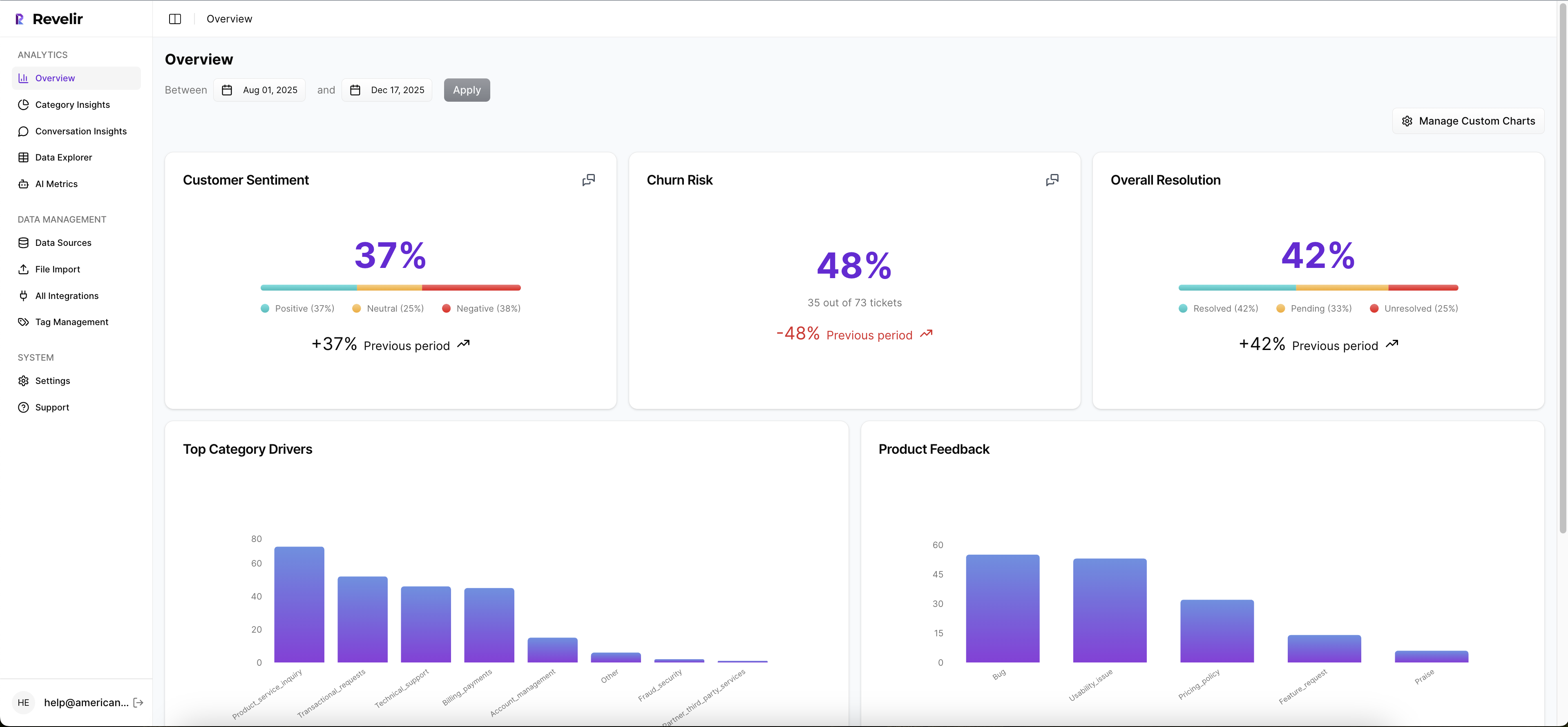
Revelir AI is built around what I'd call the Pattern-to-Proof Loop. First, it processes the full ticket set instead of relying on sample-based review. Second, it structures those conversations into AI metrics and tagging so teams can segment by sentiment, churn risk, effort, driver, or customer segment. Third, it lets you validate the grouped pattern against the underlying conversations before you take it into a cross-functional meeting. That top-down and bottom-up motion matters more than most buyers realize.

The specific mechanics matter too:
- Full-coverage processing across 100% of conversations
- AI tagging and metrics such as sentiment, churn risk, frustration signals, and product feedback
- Evidence-backed traceability from charts and metrics to exact conversations and quotes
- Data Explorer and Analyze Data workflows for segmented analysis
- Custom metrics and taxonomy in the language your business already uses
- API export plus CSV ingestion for getting data in and back out
Imagine a CX leader on Monday morning filtering negative sentiment, grouping by category driver, and seeing billing and technical support rise to the top. Then they click into the grouped result, review the underlying conversations, and walk into Tuesday's product sync with both the pattern and the proof. That's not a nicer dashboard. That's a shorter argument.
There is a tradeoff, and it's fair to say out loud. If your primary need is broad omnichannel VoC consolidation, or live agent coaching, or autonomous support automation, another tool may fit that job better. But if your team needs support conversation analytics that can stand up to scrutiny across support, product, and ops, this is a tighter fit.
What to do next if you're narrowing the shortlist
The fastest way to pick well is to run one live use case through each finalist. Use the same question, the same ticket set, and the same stakeholder audience. Then compare how fast each tool gets you from pattern to proof.
A good test case has three traits:
- It matters this quarter
- It crosses teams
- It requires evidence, not just a dashboard summary
For example, ask: which issues are driving negative sentiment for enterprise customers right now? Then see which platform can segment the data, surface the main drivers, and show the underlying conversations without a week of cleanup work.
That's the real buying moment. Not the demo. Not the website copy. The moment when your team needs to trust the answer enough to act on it.
If Chattermill already fits your broader VoC motion, that can be the right call. If you're moving toward support-native analytics, support execution, ecommerce automation, or research-grade taxonomy control, the alternatives above split into much clearer lanes. Pick the lane first. The vendor choice gets easier after that.
Frequently Asked Questions
How do I analyze support tickets with Revelir AI?
To analyze support tickets using Revelir AI, start by ingesting your support conversations through Zendesk integration or CSV uploads. Once your data is in, use the Data Explorer feature to filter and group tickets based on various metrics like sentiment, churn risk, and effort. You can drill down into specific tickets to validate insights and gather quotes for reporting. This process allows you to uncover patterns and understand the underlying issues affecting your support operations.
What if I need to customize metrics in Revelir AI?
You can create custom AI metrics in Revelir AI to tailor the analysis to your specific needs. Simply define your domain-specific classifiers and set custom questions and value options. These metrics will be stored and can be used across filters and analyses, allowing you to focus on the aspects of customer support that matter most to your team. This flexibility helps ensure that the insights you gather are relevant and actionable.
Can I track customer sentiment over time with Revelir AI?
Yes, you can track customer sentiment over time using Revelir AI's AI Metrics Engine. This feature automatically computes sentiment scores (positive, neutral, negative) for each ticket. By analyzing these scores in the Data Explorer, you can observe trends and changes in customer sentiment, helping you identify issues that may need attention. This continuous monitoring allows your team to respond proactively to shifts in customer feelings.
When should I use the Analyze Data feature in Revelir AI?
You should use the Analyze Data feature in Revelir AI when you need to run grouped analyses of your support tickets. This tool helps summarize key metrics, such as sentiment and churn risk, by dimensions like driver or tag. It's particularly useful for answering specific questions about your support operations, such as identifying which issues are causing the most customer frustration. This feature allows for deeper insights that can guide your team's actions.
Why does Revelir AI emphasize full-coverage processing?
Revelir AI emphasizes full-coverage processing because it analyzes 100% of your support conversations, eliminating blind spots and biases that often come with sampling. This approach ensures that you have a comprehensive view of customer feedback, allowing you to make data-driven decisions with confidence. By linking insights directly to the source conversations, Revelir AI builds trust with stakeholders and provides a clearer understanding of the issues at hand.