

You can’t optimize support staffing with volume and CSAT alone. It’s usually the wrong proxy. Tickets aren’t equal, and averages hide the work that actually burns hours. If you want a real plan, start with full coverage metrics from the conversations themselves, then route and schedule around effort, sentiment, churn risk, and the drivers behind them.
Here’s the simple version. Forecast demand by effort weight, not just count. Route by skill to reduce transfers. Separate low‑effort work for automation. Validate every decision against real tickets so finance stops guessing. If you do this well, cost per ticket drops, SLA holds, and rework fades. Nobody’s checking only the score anymore. They’re checking evidence.
Key Takeaways:
- Optimize support staffing with full coverage metrics, not blunt volume and CSAT
- Weight demand by effort, then route by skill to cut transfers and callbacks
- Tie sentiment and churn risk to escalation load so SLA planning is honest
- Normalize taxonomy with canonical tags and drivers to stabilize reporting
- Turn weights into shifts, flex capacity, and overflow rules you can defend
- Validate every change with ticket‑level evidence and KPI callbacks
- Target a 25% cost‑per‑ticket reduction by removing waste from handoffs and rework
Stop Using Volume And CSAT To Optimize Support Staffing
Volume and CSAT don’t capture complexity, risk, or emotion, so they miss the work that drives cost. Full coverage metrics from conversations reveal effort, sentiment, churn risk, and drivers that actually stretch handle time. When you plan with those signals, rosters match reality and SLA stops wobbling.

Why Volume And CSAT Mislead Staffing
Volume and CSAT look tidy, but they flatten variability. Two tickets can take five minutes or fifty, and a single score won’t tell you which is which. That’s the mistake. You need to see which drivers inflate effort and where frustration grows, or you’ll staff the wrong hours and lose time to callbacks.
Most teams also treat CSAT dips like the main alarm. It’s late by design. The truth lives inside transcripts where customers show effort and mention churn risk directly. Without that context, leaders debate anecdotes or watch dashboards drift. You don’t need more sampling. You need complete coverage you can audit ticket by ticket.
Same thing with transfer rates. A clean AHT at the top level hides re‑reads, second touches, and unnecessary escalations. If routing ignores drivers and skills, you pay the cost twice. Staff plans that start with effort, sentiment, and churn risk avoid this trap. You’re not guessing. You’re aligning hours to the real workload.
What Full Coverage Metrics Expose That Averages Hide
Full coverage shows where high‑effort conversations cluster and why. You see that “Billing” is calm on chat but spikes on email after policy changes. You see sentiment sour in “Account Access” for enterprise cohorts. You catch churn mentions early. Averages miss these patterns, which is why queues explode without warning.
You can also see variation by channel, tier, or region. That matters for scheduling. A botched assumption about phone complexity can blow up first reply time. With coverage, you route the hard parts to the right people before they pile up. That prevents the quiet waste that drives cost per ticket up month after month.
If you want a reference point for KPIs that still matter, use them with context, not as the plan itself. Benchmarks help, but they don’t understand your drivers or your effort mix. Tie external targets to your own effort distribution, then pressure test against real tickets. That’s the difference between “nice report” and “defendable model.”
What Does Optimize Support Staffing Actually Mean For Ops?
It means you move from generic headcount to precise coverage. Forecast demand by effort weight, not just count. Use skill‑based routing off canonical tags and drivers. Decide which tickets qualify for automation with clear thresholds. Then convert the model into shifts, overflow rules, and async backlogs you track weekly.
You validate each move with ticket‑level evidence. If you claim “Billing is high‑effort on Mondays,” click into the tickets and show it. If transfers are the problem, prove where they add minutes. Finance and product stop pushing back when the numbers link to quotes. That’s the governance that keeps the plan from drifting.
And you keep a short feedback loop. The first version won’t be perfect. That’s fine. You iterate as the taxonomy stabilizes and the business changes. Most misses happen because nobody ties the plan back to the conversation evidence. Do that, and the cost curve bends in the right direction.
Map Full Coverage Signals To Optimize Support Staffing KPIs
Effort, sentiment, churn risk, and drivers predict workload better than raw volume. Map those signals to AHT, SLA, transfers, and callbacks, then convert labor minutes to cost. When KPIs connect to drivers you can explain, staffing turns from guesswork into a defendable model you can adjust weekly.

Link Sentiment, Effort, And Churn Risk To AHT, SLA, And Cost
Start with simple math. High‑effort raises handle time. Negative sentiment with churn risk raises escalation probability and callback chance. Those two realities should feed AHT and SLA projections, not sit in a separate “insights” deck. If they don’t, you’ll miss the real load and fail the hours that matter.
Translate this into costs. Cost per ticket is labor minutes times loaded hourly rate. If callbacks add 0.2 tickets per case in a driver, your true cost is higher than the single close time implies. Put that into your plan before it surprises you. You’re not padding. You’re modeling what work actually costs.
Track shrinkage honestly. Some drivers demand coaching and deeper reviews that don’t show up in the front‑door metrics. If those minutes live outside the staffing model, SLA risk creeps in. Tie shrinkage buffers to drivers and effort tiers, not a flat rate. It’s precise, and it prevents the slow bleed.
Use Canonical Tags And Drivers To Normalize Categories
Raw tags are great for discovery, but staffing models need stable categories. Map raw tags into canonical tags and drivers leadership recognizes, then group by driver for routing and reporting. You get clarity without losing detail. And you stop rewriting the taxonomy every month, which wastes time and breaks trust.
Drivers also make communication cleaner. “Billing” or “Account Access” means something to the room. When you show negative sentiment by driver with ticket examples, the plan becomes easy to defend. You don’t argue about labels. You decide what to fix or where to staff up for peak windows.
In practice, this is a rhythm. New raw tags appear. You merge and remap them into canonical tags. Reports stabilize. The staffing model inherits the stable view. That’s the point. The model and the taxonomy evolve together, and nobody’s stuck reconciling five different tag names for the same problem.
Which Metrics Predict Staffing Need Better Than Volume?
Customer effort predicts handle time. Driver and canonical tag predict skill match and transfer risk. Sentiment and churn risk predict escalation and callbacks. Combine those four with volume to estimate labor minutes per ticket by cohort. Then validate weights with real tickets so the plan doesn’t drift into theory.
You can check this fast. Filter to negative sentiment with churn risk, group by driver, then sample tickets to confirm the pattern makes sense. If your weights look wrong, adjust them. It’s not abstract modeling. It’s a loop between metrics and transcripts. That loop is what keeps SLA from slipping at the worst moments.
We like volume for scale, not for truth. The truth is in the mix. When the mix tilts toward high‑effort drivers, hours need to follow. When it tilts back to low‑effort resets, automation should absorb the load. That’s how you protect SLA without overspending.
Metrics that matter in IT support
The Cost Of Failing To Optimize Support Staffing With Effort And Risk
Ignoring effort and risk creates a compounding problem. Transfers rise, rework grows, and callbacks inflate tomorrow’s queue. SLA slips trigger escalations that cost more to resolve. The waste isn’t obvious in top‑line reports, but it shows up in cost per ticket and team burnout.
The Compounding Cost Of Transfers And Reassignments
Transfers look small in a weekly rollup. They aren’t. Each handoff adds re‑read time, context loss, and a fresh chance to miss something. That drives frustration and repeat contacts. If routing isn’t tied to drivers and skills, the transfer rate climbs and AHT balloons. CSAT dips and the pattern repeats.
This is where most teams go wrong. They optimize the average, not the spikes. Averages hide handoffs. They hide edge cases. By the time the trend shows up in CSAT, you’ve already missed the fix. The cost is real, even if the dashboard looks calm. It’s the silent waste that kills margins.
Solve it at the source. Route the hard drivers to people who can close them on the first touch. Use driver‑based queues, not generic tiers. Then measure transfer rate and AHT by driver. When the numbers drop, callbacks fall and cost per ticket follows.
Overstaffing And Understaffing Scenarios, Let’s Pretend
Let’s pretend you staff on volume alone. Week A hides a 20 percent spike in high‑effort billing tickets. Understaffing misses SLA, escalations jump, and callbacks add 0.2 tickets per case. Week B swings to low‑effort password resets, but you keep yesterday’s headcount. Overstaffing burns budget. Both errors come from missing the mix.
Now flip it. If effort weights shape schedules, Week A gets more skilled hours on billing. Transfers fall, SLA holds. In Week B, automation absorbs resets and humans focus on risk. You don’t need perfect accuracy to win here. You need to be less wrong than a blunt average.
We’re not asking you to trust a black box. Validate with tickets. Show the three calls that explain Week A’s spike. Show the chat transcripts that prove Week B is safe to automate. That’s how you avoid fear‑based overstaffing or wishful thinking that fails your customers.
Why Do Underestimated Effort Spikes Blow Up SLA?
Because high‑effort tickets stretch handle time and demand domain experts. If you don’t pre‑allocate skilled agents, queues stall, and first reply time slips. Negative sentiment grows, which raises escalation probability. The loop feeds itself until somebody pulls a fire drill.
Effort detection and driver‑based routing break the loop. You can see the spike where it starts, not at the CSAT endpoint. You can move hours to the drivers that need them before the queue tilts. That’s how you protect SLA without throwing expensive bodies at the problem.
If you want a sanity check, compare staffing assumptions to ticket‑level examples. If they don’t line up, the plan is wrong. Fix the inputs first. Then fix the schedule.
When Schedules Ignore Real Effort, Everyone Feels It
Schedules that ignore effort create human cost. Agents carry the load. Managers carry the escalations. Customers carry the frustration. The work doesn’t go away. It just gets more expensive and harder to recover from next week.
The On‑Call Night That Breaks Your Team
You’ve seen it. A policy change lands on Friday. Effort spikes. Queues stack. Your best agent becomes the bottleneck. You pull people in. Morale sags. Monday starts in a hole. The lesson isn’t work harder. It’s plan from evidence so nights and weekends don’t rely on heroics.
We’ve lived this. The fix wasn’t a bigger headcount right away. It was driver‑based coverage that matched reality. Once we routed the hard tickets to the right pod and moved easy ones to automation, the midnight panic faded. The next week, escalations dropped, and so did rework.
This isn’t about perfection. It’s about avoiding preventable pain. If you can predict the hard parts, you can protect your people. That shows up in retention and quality. It also shows up in cost.
Agent Experience When Effort Is Invisible
Rework is demoralizing. So are ping‑pong transfers and vague tickets that should have been automated. When agents can predict complexity and see clear routing, they prepare, they resolve faster, and they feel ownership. That reduces coaching time because patterns are visible and consistent.
You don’t need to guess what to fix. Agents will tell you if the system makes sense. If they keep asking for context or hunting for the right queue, the plan is broken. When the plan is right, the chatter changes from “why is this on my desk” to “here’s what I closed and why it worked.”
We might be wrong about one thing in your world, but we’re confident about this. Invisible effort always finds a way to the surface. Either you model it willingly, or it burns you in the metrics you care about most.
What Do Leaders Fear When Headcount Is On The Line?
Two things. Overspending on low‑value hours and missing SLA when it matters. Both are avoidable if you can show ticket‑level proof that high‑effort, high‑risk work drives cost. Leaders don’t need theater. They need a model that says where each hour goes and what it returns.
Bring them evidence‑backed distributions, not a plea for more people. Show how effort weights translate into minutes and how minutes turn into dollars. Then show the quotes behind the metrics. The debate shifts from “do we believe this” to “what should we do next.”
That’s how you get alignment without a fight. It’s not magic. It’s traceable math connected to real conversations.
Measuring performance for outsourced IT support
How To Optimize Support Staffing With A Forecasting And Routing Playbook
The playbook is simple to understand and hard to skip. Build a weighted forecast from full coverage metrics. Set thresholds for automation versus human handling. Route by skill from canonical tags and drivers. Turn the plan into shifts and flexible capacity you can adjust weekly.
Build A Weighted Demand Forecast From Full Coverage Metrics
Your forecast starts with the last 8 to 12 weeks of ticket volume, split by driver and channel. Then you add effort weight per ticket, sentiment distribution, and churn risk density. You translate those weights into labor minutes per cohort, rolled up to daily and intraday intervals you can actually staff.

Don’t treat shrinkage like a flat tax. Attach it to time blocks and drivers. Coaching and QA time skew toward certain categories, not all work. You’ll miss by a mile if you ignore that pattern. Validate the curve with ticket examples and compare to actuals weekly. If the mix shifts, the plan shifts.
To put this into practice:
- Compile volume by driver, channel, and tier for 8 to 12 weeks.
- Apply effort weights and add sentiment and churn risk densities.
- Convert weighted tickets to labor minutes per cohort and interval.
- Attach shrinkage by block and driver, not a single global rate.
- Compare to actual handle time and adjust weights weekly.
IT support response benchmarks
Set Decision Thresholds For Automation Versus Human Handling
Define clear gates. Low‑effort, low‑risk tickets with minimal negative sentiment qualify for macros or deflection. High‑effort or any churn‑risk tickets route to humans. Document thresholds with examples so nobody argues about the edge cases in the heat of the moment.
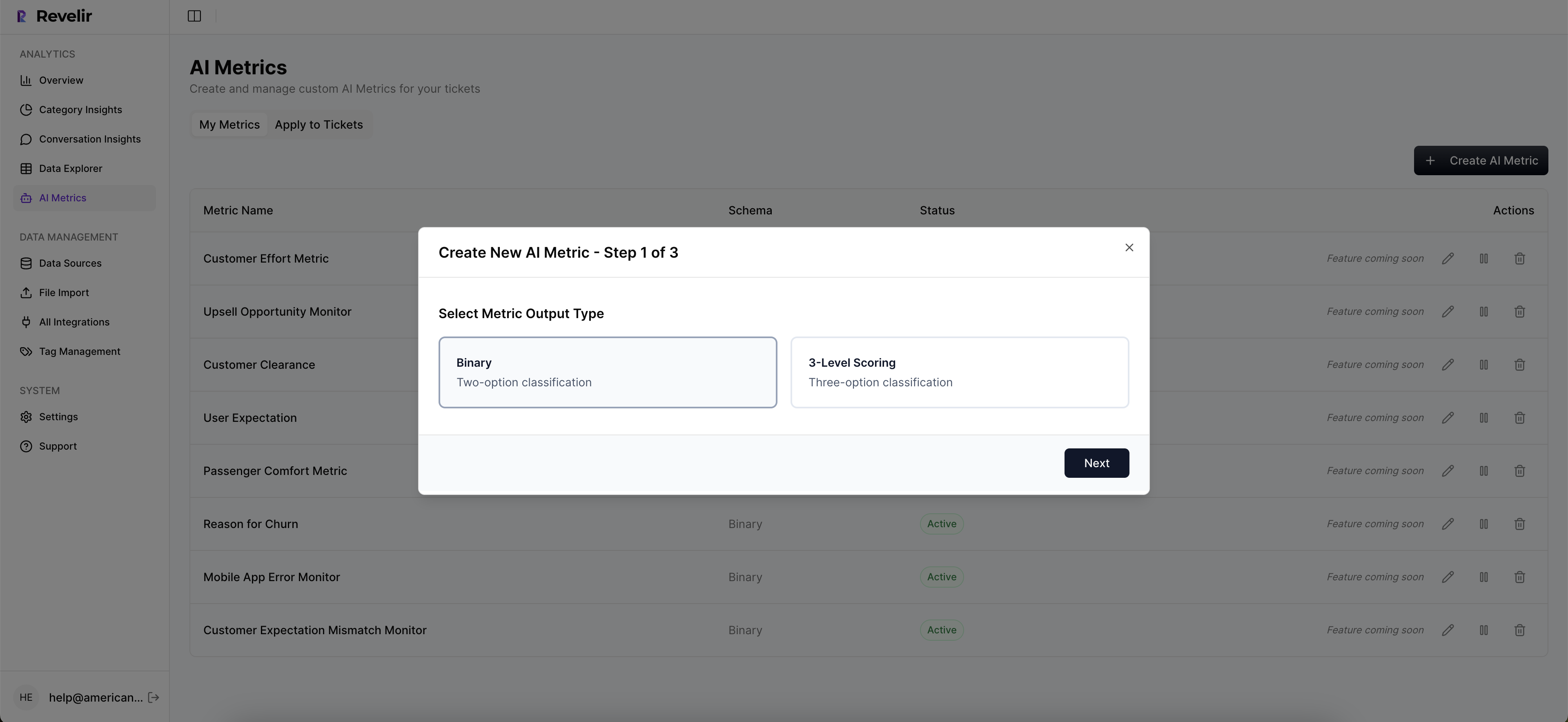
Test the thresholds weekly. Pull a few tickets on each side of the line. If something “feels wrong,” fix the rule or the weight. This is a living system. The goal is fewer manual touches on easy work and more skilled focus on risk. It’s how you cut waste without hurting quality.
Make thresholds stick with simple steps:
- Write criteria for low‑effort, low‑risk automation candidates.
- Define risk overrides that force human routing.
- Attach two real ticket examples to each rule to show context.
- Review misroutes and update rules in a weekly check‑in.
Design Skill‑Based Routing From Canonical Tags And Drivers
Use canonical tags and drivers to encode skill rules. Map Billing, Account Access, or Performance to specific queues and seniority. If a ticket matches two high‑risk drivers, route it to a blended pod with both skills. Watch transfer rate and AHT by driver, then refine as your taxonomy matures.

You don’t need 20 rules to start. Begin with the top three drivers that create the most pain. Reduce transfers there first. It pays back quickly. Then add nuance as you see patterns hold. The point isn’t complexity. It’s getting the hard stuff to the right people the first time.
Operationalize the routing rules:
- Define driver‑to‑queue mappings and required seniority.
- Set an override for tickets matching multiple high‑risk drivers.
- Track transfer rate and AHT per driver each week.
- Adjust queues or training where the data shows friction.
Turn Forecasts Into Shifts And Flexible Capacity
Translate the demand curve into shift templates. Cover known spikes with core hours. Layer part‑time, overflow vendors, or async backlogs where variability is highest. Reserve a flex buffer for volatile drivers. Publish a quick weekly review so you adjust early, not in a Friday fire drill.
Tie the staffing changes to KPI callbacks. Watch cost per ticket, SLA adherence, and transfers after each change. If the numbers move the wrong way, click into tickets and find out why. Then fix the plan at the source. That loop is what keeps the plan honest.
Convert plan to schedule with steps:
- Build shift templates aligned to intraday demand.
- Assign core hours to stable drivers and flex to volatile ones.
- Add overflow and async backlogs for predictable spikes.
- Review gaps weekly and adjust before they become crises.
After adopting this playbook, ready to reduce cost per ticket by 25 percent without guesswork? See how Revelir AI works
How Revelir AI Turns Conversation Metrics Into Staffing Decisions
Revelir AI processes 100 percent of tickets and links every metric to the exact conversation, so your forecast and routing rules are built on complete, auditable data. You replace sampling and score‑watching with effort, sentiment, churn risk, tags, and drivers that finance and product can verify in a click.
Full Coverage And Traceability Reduce Forecast Error
Revelir’s full‑coverage processing analyzes every conversation automatically. No sampling. Each ticket gets AI metrics like Sentiment, Churn Risk, and Customer Effort, plus raw and canonical tags. The important part is traceability. Every chart connects to Conversation Insights so you can show the quotes behind a number in seconds.
This changes the planning math. When a driver shows elevated high‑effort distribution, you can click straight into representative tickets to confirm why. When churn risk clusters in a segment, you see it and route accordingly. Forecast error shrinks because inputs are complete, and trust grows because nobody’s guessing about source context.
If your Rational Drowning showed transfers inflate AHT by minutes, Revelir helps you prove the fix. Reduce transfers through driver‑based routing, then measure the drop in minutes and show the regained capacity. It’s not a black box. It’s evidence at every step.
Data Explorer And Analyze Data Power Routing And Roster Design
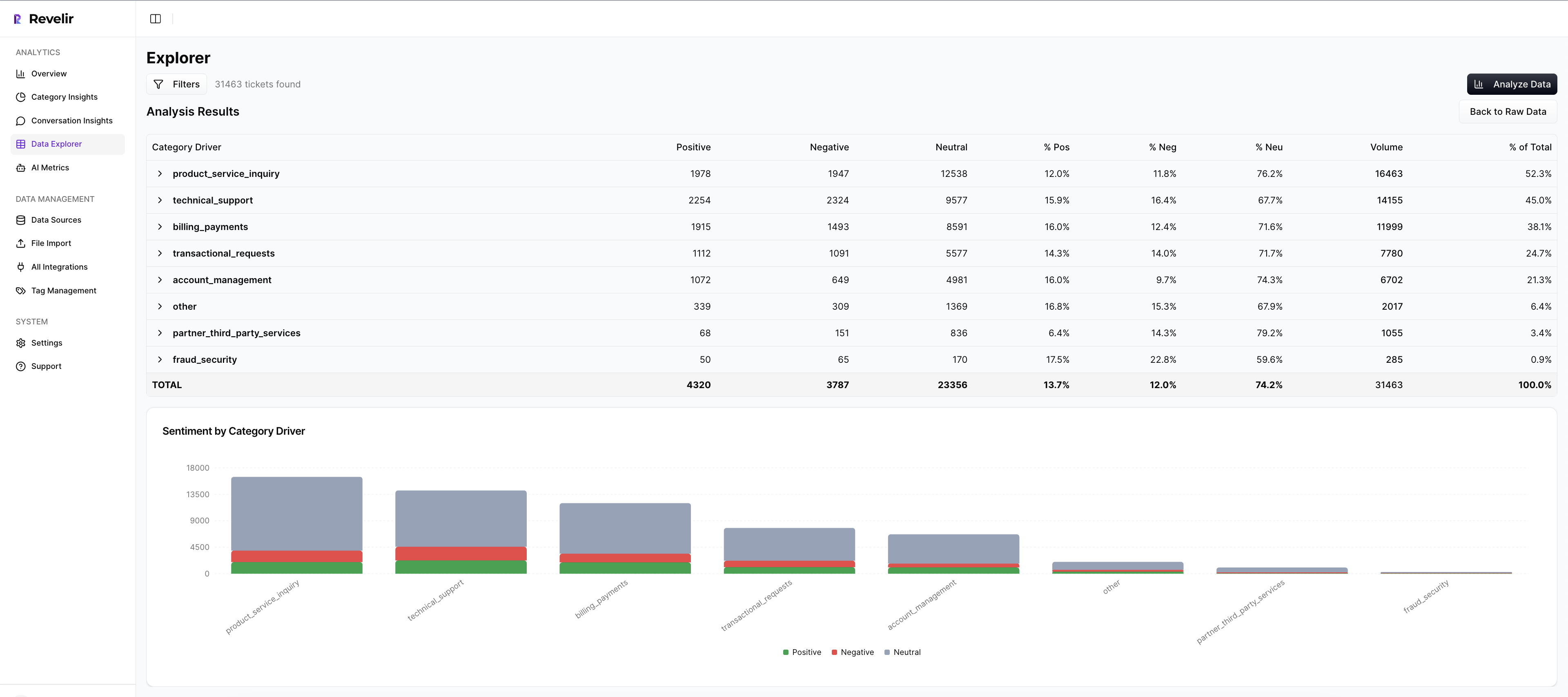
Data Explorer is where you work day to day. Filter by effort, sentiment, churn risk, driver, and canonical tags. Add or remove columns you care about. Group by driver or category. From any segment, click into the tickets behind it to audit accuracy or gather examples for leadership.
Analyze Data gives you grouped views and charts in a few clicks. Run “Sentiment by Driver,” “Churn Risk by Category,” or “Effort by Driver,” then spot concentrations without exporting to BI. Those views make routing rules obvious and shift design faster. You’re answering real staffing questions in minutes, not weeks.
When finance asks for proof, you have it. Show the grouped table. Then open the tickets. That move resolves most pushback before it starts. You’re connecting decisions to evidence, which is what leaders expect.
Validate Changes With Ticket‑Level Evidence And KPI Callbacks
Set a baseline for AHT, SLA adherence, transfer rate, and cost per ticket. After you change routing or shifts, compare distributions in Analyze Data and drill into outliers. If transfer‑driven AHT was the problem, show the transfer drop and the minutes you got back. If callbacks were inflating volume, show the before‑after density.
Revelir ties each KPI shift back to the real conversations. That audit trail earns buy‑in. When everyone sees why a change worked, it sticks. When something doesn’t work, you find the cause quickly and adjust without drama.
Key capabilities you’ll use:
- Full‑coverage processing of 100 percent of tickets with no sampling
- AI Metrics for Sentiment, Churn Risk, and Customer Effort, plus custom metrics you define
- Data Explorer for filtering, grouping, and fast ad‑hoc analysis tied to transcripts
- Analyze Data for grouped insights and charts you can act on
- Conversation Insights for click‑through evidence that validates every conclusion
25‑minute setup. Full‑coverage metrics you can audit. That’s what Revelir delivers. Learn More
Conclusion
Optimizing support staffing isn’t about more dashboards. It’s about modeling real work with full coverage metrics, then turning that model into routing and schedules you can defend. Use effort, sentiment, churn risk, and drivers to predict minutes, assign skills, and absorb risk before it hits your SLA.
Do the simple things well. Forecast with weights, route with drivers, automate the easy stuff, and validate with ticket evidence. You’ll cut waste from transfers and rework, protect your team, and lower cost per ticket. When you want the fastest path from conversation to decision, Revelir keeps the evidence one click away. Ready to make the new plan real? Get Started With Revelir AI
Frequently Asked Questions
How do I reduce churn risk using Revelir AI?
To reduce churn risk with Revelir AI, start by filtering your tickets to identify those flagged with high churn risk. You can do this in the Data Explorer by setting the churn risk filter to 'Yes'. Next, use the Analyze Data feature to group these tickets by drivers or categories to see which issues are most prevalent. This will help you pinpoint specific areas that need attention, such as onboarding or billing issues. Finally, take actionable steps based on the insights you gather, like improving processes or reaching out proactively to at-risk customers.
What if I want to track customer effort over time?
To track customer effort using Revelir AI, you can utilize the Customer Effort Metric (CEM). First, ensure that your dataset has sufficient conversational cues to generate accurate CEM values. Then, in the Data Explorer, filter tickets by customer effort to see which interactions are categorized as high or low effort. You can also run analyses over specific time periods to identify trends. This will help you understand where customers face friction and allow you to make improvements to reduce effort in those areas.
Can I customize metrics in Revelir AI?
Yes, you can customize metrics in Revelir AI to match your business language. To do this, define your custom AI metrics based on the specific needs of your organization, such as 'Upsell Opportunity' or 'Reason for Churn'. Once defined, these metrics will be applied consistently across your dataset. You can then use them in the Data Explorer to filter and analyze your tickets, helping you gain insights that are directly relevant to your business objectives.
When should I validate insights with Conversation Insights?
You should validate insights with Conversation Insights whenever you identify significant trends or anomalies in your data. For instance, if you notice a spike in negative sentiment linked to a specific driver in the Data Explorer, click through to Conversation Insights to review the actual conversations behind those metrics. This helps ensure that the patterns you observe align with the real experiences of your customers, allowing you to make informed decisions based on solid evidence.
Why does Revelir AI emphasize full coverage of conversations?
Revelir AI emphasizes full coverage of conversations to eliminate bias and ensure that no critical signals are missed. By processing 100% of your support tickets, Revelir provides a complete view of customer interactions, capturing frustration cues, churn mentions, and product feedback that might be overlooked in sampling methods. This comprehensive approach allows teams to make data-driven decisions based on reliable insights, ultimately improving customer experience and reducing costs.