

78% of CX teams still lean on surveys and sampled reviews for customer insight, but support tickets hold the bigger signal. If you've sat in a product review this week trying to defend a trend line with two screenshots and a gut feeling, you already know the problem.
You can use data analysis tools all day and still miss what's actually breaking for customers. It's usually not a dashboard problem. It's that the source data never got turned into something leadership can trust in the first place.
If you want a quick look at what evidence-backed support analysis looks like, Learn More.
Key Takeaways:
- Most teams use data analysis tools on top of thin, sampled, or badly tagged support data
- Scores tell you what moved, but drivers and ticket evidence explain why
- If you're reviewing fewer than 20% of conversations, you're managing risk with partial vision
- A useful support intelligence system needs 100% coverage, custom metrics, and traceability to real tickets
- The fastest way to earn trust in leadership reviews is to make every chart clickable back to quotes
- Better decisions come from structured conversation data, not louder anecdotes
Why Most Data Analysis Falls Apart in Support
Support data analysis breaks when teams try to measure free-text conversations with tools built for clean tables. That's why so many reports look polished but fall apart the second someone asks for proof. You don't just need to use data analysis tools. You need data analysis tools that can handle messy support conversations without stripping out the context that matters.

A support leader pulls a monthly report Sunday night. Zendesk export. Spreadsheet cleanup. A few manual tags. Maybe some CSAT comments. By Monday morning, there's a slide that says billing frustration is rising. Then someone in product asks, "Based on what?" Now the whole room is arguing over six tickets and one score trend. Sound familiar?
The dashboard is not the system
Most teams act like the reporting layer is the strategy. Same thing with sentiment. They buy a tool, get a red-yellow-green chart, and call it customer insight. But a chart without source evidence is just a prettier version of guesswork.
The real issue isn't lack of effort. It's a broken evidence chain. I call this the Chart-to-Truth Gap: the distance between the number on the slide and the original customer words behind it. If that gap takes more than 3 clicks or 2 different tools to cross, trust drops fast. In exec reviews, that gap kills momentum.
Manual reviews deserve a fair defense here. Humans catch nuance. That's true. But once volume crosses 1,000 tickets a month, manual review turns into selective memory with better intentions. You remember the dramatic cases. You miss the quiet patterns.
Sampling creates false confidence
Sampling feels responsible because it looks analytical. Let's pretend you handle 8,000 tickets a month and review 400. That's a 5% sample. Even if the sample is random, the edge cases you care about most usually aren't evenly distributed. Churn mentions, effort spikes, onboarding confusion, pricing panic. Those signals tend to cluster.
If you review less than 20% of conversations, use this rule: don't make segment-level product decisions from it. Use it for hypothesis generation only. That's the Coverage Rule. Below 20%, patterns are directional. At 100%, they become operational.
Researchers have been making this same point for years in adjacent fields: weak samples produce unstable conclusions, especially when behavior varies by cohort and context. You can see the logic in survey methodology guidance from the Pew Research Center and in customer analytics discussions around text data quality from the Qualtrics XM Institute. Different domain, same underlying problem.
Scores are easy to present and hard to act on
CSAT and NPS aren't useless. They just aren't enough. That's an important concession. If you're tracking broad experience trends, scores help. They give leadership a common number. No argument there.
But scores aren't strategy. A score tells you there was smoke. It doesn't tell you what caught fire. When sentiment dips 7 points, what do you fix first? Billing confusion for enterprise accounts? Onboarding friction for new users? A broken workflow after a release? Nobody knows unless the analysis can surface drivers and ticket evidence at the same time.
And that's the part teams feel in their bones. You spend hours building a readout, then five minutes into the meeting you're back in anecdote-land. The next section matters because the problem isn't reporting. It's what you're asking reporting to do.
The Real Problem Is Unstructured Evidence, Not a Lack of Tools
The root cause is simple: support teams collect conversations, but leadership needs structured evidence. That mismatch is why teams use data analysis tools and still end up with weak decisions. The issue isn't that you need more dashboards. It's that the raw material entering those dashboards was never translated into something reliable.
Free text doesn't become insight by itself
A support ticket is messy on purpose. That's where the truth is. Customers ramble. Agents clarify. Context shows up halfway through the thread. One sentence hints at churn risk. Another reveals effort. A third points to a product bug nobody tagged.
Now put that into a spreadsheet pipeline. Most of the meaning gets flattened. The nuance disappears first, then the causality. What survives is usually volume, resolution time, and maybe a hand-built tag column if somebody cared enough that week.
That's why I think "just export it to BI" is one of the most expensive half-solutions in CX. BI is great once the data is structured. Before that, you're just visualizing chaos. You can use data analysis tools downstream all you want, but if the upstream classification is inconsistent, the output will be too.
You need a translation layer
The better model is what I'd call the Evidence Stack. Four layers:
- Coverage: analyze 100% of conversations, not a sample
- Structure: convert free text into metrics, tags, and drivers
- Traceability: link every aggregate back to the original ticket
- Decisioning: use the pattern to prioritize action
Miss one layer and the whole thing gets shaky. Coverage without structure gives you a mountain of text. Structure without traceability gives you black-box AI. Traceability without decisioning gives you interesting screenshots and no action.
This is also where custom metrics matter more than most teams expect. Basic sentiment is too generic for real operating decisions. A support org might need to track refund intent, onboarding friction, escalation risk, or upgrade opportunity. A product team might need setup blockers, feature confusion, or release regression signals. If the metric language doesn't match your business language, nobody really uses it.
Trust is the real bottleneck
People think the bottleneck is analysis speed. Honestly, it's trust. A team can move pretty fast with imperfect numbers if everyone believes the numbers mean something. They slow to a crawl when every finding triggers a debate about source quality.
There was a study from MIT Sloan Management Review on data trust that made this painfully clear: decisions stall when leaders don't trust how the data was produced. Same thing with support analysis. If your chart isn't traceable to real tickets and quotes, it becomes political the second priorities are on the line.
So the question shifts. Not "Which dashboard should we use?" More like: what kind of analysis system turns support conversations into evidence strong enough to survive scrutiny?
How to Use Data Analysis Tools Without Losing the Story
You should use data analysis tools to compress complexity, not hide it. The right approach starts with conversation-level evidence, then builds upward into metrics, patterns, and decisions. If you invert that, you get attractive reporting and weak insight.
Start with the diagnostic, not the dashboard
Before you add another layer of reporting, ask three questions. This is the Support Signal Test.

- Can you explain what happened across 100% of conversations, not just sampled ones?
- Can you show why a metric moved using drivers or tags, not just scores?
- Can an exec click from the chart to the exact ticket or quote behind it?
If you answered no to two or more, you're not really doing support intelligence yet. You're doing support summarization. Different thing.
That sounds harsh, but I don't mean it as a dunk. Most teams are in that exact state. Nobody's checking whether the reporting system can survive a challenge because the team is too busy producing the report.
Build around a 3-layer model
A practical model looks like this. I call it the DDD loop: Detect, Diagnose, Defend.
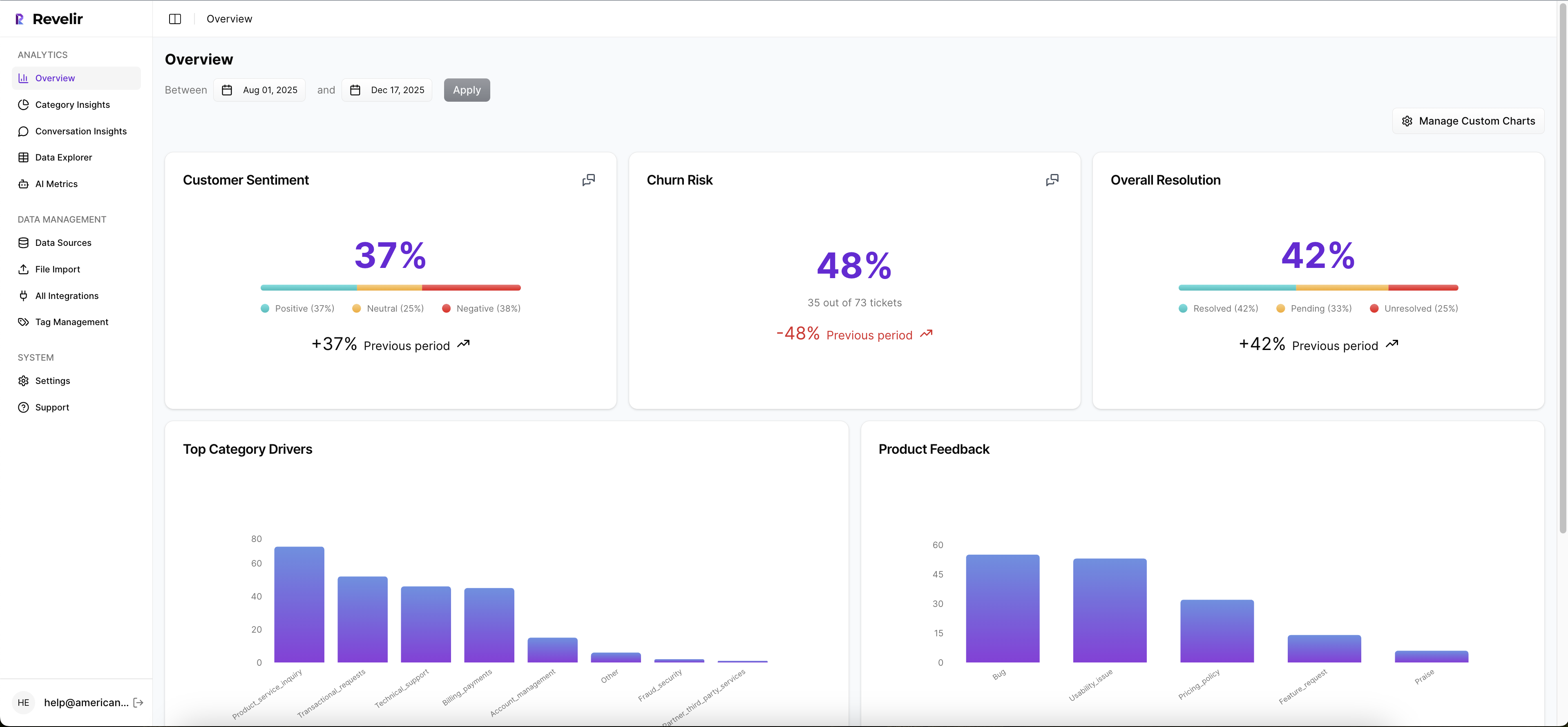
Detect with full coverage metrics
Detection means scanning the whole ticket set for movement. Not a sample. Not just survey responses. The reason is simple: support problems often start as weak signals spread across hundreds of conversations.
Use data analysis tools here to track structured fields like sentiment, churn risk, effort, outcome, and custom metrics. If a trend moves by more than 15% week over week in a priority segment, investigate. That's the 15% Trigger. Below that, monitor. Above that, drill in.
The before-and-after difference is huge. Before, a team sees rising ticket volume and assumes staffing strain. After, they see that effort is rising specifically for new accounts touching onboarding flows. That's a fixable diagnosis, not just a scary number.
Diagnose with drivers and business-language metrics
Diagnosis is where most teams fail. They stop at the score. Don't stop there. Group the issue by driver, tag, customer segment, or custom metric. That's how you move from "something is off" to "this workflow is causing pain for this cohort."
Custom metrics matter a lot here because generic taxonomies rarely match how your business actually works. An airline support team might care about passenger comfort and rebooking friction. A SaaS company might care about admin setup blockers and downgrade intent. Same thing with product-led teams tracking activation pain. If the classifier doesn't fit the business, your analysis will stay surface-level.
One rule I like: if a pattern can't be named in your team's own words, it won't get prioritized. That's the Language Fit Rule. Data analysis tools only become useful when they speak the language the roadmap already uses.
Defend with traceable evidence
This is the overlooked part. You don't just need insight. You need insight that survives the meeting. So every aggregate needs a path back to the underlying conversations.
Let's pretend you're presenting a 22% rise in churn risk tied to billing tickets. Without source evidence, product may push back, finance may reinterpret it, and support may hedge. With traceable tickets and quotes, the conversation changes. Now you're debating response, not reality.
That shift is everything. I haven't seen many teams talk about this clearly, but it's probably the main reason some insight programs influence roadmaps and others just decorate QBRs.
If you want to see what that looks like in practice, See how Revelir AI works.
Keep one foot in raw conversations
Good analysis abstracts. Great analysis abstracts without losing the original voice of the customer. That's a different standard.

A useful way to work is 80/20. Spend 80% of your review time in structured analysis and 20% validating against raw tickets. If that ratio flips, you're back in manual review hell. If it drops to zero, you're trusting the machine too much. Fair point, black-box automation can move quickly. It just doesn't hold up when leadership asks for receipts.
This is where ticket drill-downs and summaries help. You need enough structure to move fast, but enough raw context to catch misreads early. Compression without distortion. That's the goal.
Use lists to force better decisions
When teams use data analysis tools well, they tend to rank decisions the same way. Not by volume alone. By a tighter set of filters:

- Which issue affects the highest-value segment
- Which driver is rising fastest over the last 30 days
- Which pattern shows high effort and churn risk together
- Which issue appears across multiple tags, suggesting a systemic problem
- Which finding has enough ticket evidence to defend in a product review
That list matters because it pulls you out of reactive mode. You're no longer chasing the loudest escalation. You're prioritizing what the conversation data is actually telling you.
And that's the pivot. Not more dashboards. Better evidence design.
How Revelir Makes Support Analysis Defensible
Revelir AI turns messy support conversations into structured metrics you can actually use in operating reviews. More important, it keeps the evidence attached. So when you use data analysis tools inside Revelir, you're not choosing between speed and proof.
Full coverage first, then metrics that fit your business
Revelir processes 100% of ingested tickets through Full-Coverage Processing, so you're not stuck sampling or manually tagging before analysis starts. That matters because sampled reviews tend to create the exact false certainty most teams are trying to escape. With Zendesk Integration or CSV Ingestion, teams can bring in historical and ongoing conversations without rebuilding the helpdesk stack.
From there, Revelir applies its AI Metrics Engine across the full dataset, including Sentiment, Churn Risk, Customer Effort, and Conversation Outcome. It also supports Custom AI Metrics, which is where things get more useful for actual operators. You can define classifiers in your own business language, then use those fields like any other analysis column. Same thing with support teams that need more than generic sentiment. They need measurements that map to how the business actually works.
Drivers, tags, and traceability in one place
Revelir's Hybrid Tagging System combines AI-generated Raw Tags with Canonical Tags your team can shape over time, then uses Drivers to roll issues into leadership-friendly themes. That gives you both discovery and reporting discipline. Emerging patterns show up. Internal language stays clean. And because Revelir remembers mappings, the taxonomy gets more useful as your dataset grows.
Inside Data Explorer, teams can filter, group, sort, and inspect every ticket with columns for tags, drivers, AI metrics, and custom metrics. Analyze Data adds grouped summaries and visual breakdowns by dimensions like Driver, Canonical Tag, or Raw Tag. Then comes the part most teams are missing: Evidence-Backed Traceability. Every aggregate number can link back to source conversations and quotes, and Conversation Insights gives drill-down access to transcripts, summaries, tags, drivers, and metrics for ticket-level validation.
That changes the meeting dynamic. Instead of saying, "We think billing confusion is rising," you can show the metric, the segment, and the underlying tickets in one chain. That's why Revelir tends to land with CX and product leaders who are tired of defending conclusions built from partial evidence.
If you want to put that model in place without changing your helpdesk workflow, Get started with Revelir AI (Webflow).
What Better Support Analysis Actually Leads To
Using data analysis tools well means your team stops reporting on noise and starts making calls on evidence. The old way gives you sampled opinions, score trends, and a lot of interpretive dance. The better way gives you full coverage, business-specific metrics, and a direct line from chart to quote.
That doesn't mean every company needs the same setup on day one. Fair point. Smaller teams can live with simpler workflows for a while. But once support volume rises, once product wants proof, once leadership asks why a metric moved, the weak spots show up fast.
So start with a higher bar. Measure all the conversations you can. Structure them in business language. Keep every finding traceable to the source. That's how support data becomes credible enough to change priorities, not just describe them.
Frequently Asked Questions
How do I ensure full coverage of support tickets?
To ensure full coverage of support tickets, you can use Revelir AI's Full-Coverage Processing feature. This processes 100% of ingested tickets without the need for manual tagging, which helps eliminate blind spots and biases from sampling. First, connect Revelir to your helpdesk, like Zendesk, to automatically import historical and ongoing tickets. Then, start analyzing the complete dataset to gain insights without missing critical conversations.
Can I create custom metrics for my specific needs?
Yes, you can create custom metrics using Revelir AI's Custom AI Metrics feature. This allows you to define specific classifiers that align with your business language, such as tracking refund requests or onboarding friction. To set this up, navigate to the Custom AI Metrics section in Revelir, define your custom questions and value options, and then use these metrics across your analyses to gain more relevant insights.
What if I need to analyze historical ticket data?
If you need to analyze historical ticket data, you can use the CSV Ingestion feature in Revelir AI. Simply export your tickets from your helpdesk as a CSV file and upload it into Revelir. The system will parse the data and apply its full tagging and metrics pipeline, allowing you to analyze past conversations just like ongoing ones. This way, you can uncover trends and insights from historical data without needing to change your existing helpdesk setup.
How can I link metrics back to original support tickets?
You can link metrics back to original support tickets using Revelir AI's Evidence-Backed Traceability feature. This allows every aggregate number you analyze to connect directly to the source conversations and quotes. To utilize this, simply run your analyses in the Data Explorer and click on any metric to drill down into the underlying tickets. This feature helps build trust in your insights by providing clear evidence for your findings.