

Three tools can look affordable on a buying sheet and still cost a five-person support team 40 extra hours a month. If you’ve spent this week bouncing between Zendesk views, spreadsheets, and a CSAT chart that explains nothing, you already know the problem.
Small support analytics teams don’t need a giant Voice of Customer stack. They need software that gets live fast, shows what’s actually going wrong in tickets, and gives them proof they can take into a product or ops meeting. That’s the lens for this comparison of qvasa, SentiSum, SupportLogic, Siena, Chattermill, and Revelir AI when evaluating the best software for small support analytics needs.
[Table: Platform] — See "Table Embed Codes" in Oleno to copy the HTML for this table.
Key Takeaways:
- qvasa fits fastest when your world is mostly Zendesk queue monitoring, alerts, and lightweight operational visibility.
- SentiSum is usually the strongest growth-stage option if you can absorb sales-led pricing and a more involved rollout.
- SupportLogic makes sense only after support ops gets specialized, especially when QA, coaching, and escalation prediction matter more than simplicity.
- Siena is best read as an ecommerce automation buy, not a general-purpose support analytics tool for small SaaS or service teams.
- Revelir AI fits teams that need ticket-level proof, custom AI metrics, and a direct path from aggregate pattern to the exact conversation behind it.
What Small Teams Actually Need From Support Analytics Software
If you’re searching for the best software for small support teams, the answer usually has less to do with feature count and more to do with operational friction. Small-team support analytics software should cut time to insight, not add another layer of admin, especially for teams under roughly 25 support agents.
What “small business software” means in support analytics
For support analytics, "small business software" usually means a tool a lean team can launch in under 30 days without a dedicated analyst. If setup drags past one quarter, small teams often abandon the project or reduce it to dashboard screenshots. That’s the first threshold worth using.
On Tuesday morning, a support lead opens Zendesk, sees backlog climbing, and exports 200 tickets to CSV because nobody trusts the tags. By noon, they’ve grouped complaints by hand, but they still can’t say which issue hurts enterprise customers most. The work feels productive. It isn’t. It’s just expensive guessing.
I’d call this the 30/3 rule. If a platform can’t show one credible answer in 30 days and one usable pattern in 3 clicks, it’s probably too heavy for a small team. Some enterprise buyers can wait longer, and fair enough, they may get more control in return. Small teams usually can’t.
The core buying criteria: setup, visibility, proof, and cost
When teams compare the best software for small support operations, the useful criteria are boring on purpose: setup time, visibility depth, proof quality, and total cost. Those four factors beat flashy AI claims because they map to whether the tool survives past the pilot.
A useful mental model here is the Proof Ladder. Level 1 is a score. Level 2 is a theme. Level 3 is a theme tied to a segment. Level 4 is that same pattern tied back to the underlying tickets and quotes. If your team routinely has to defend findings to product, finance, or leadership, don’t buy below Level 4.
Before you shortlist anything, ask four diagnostic questions:
- Can we get live without extra data engineering?
- Can a manager find a root cause in fewer than 5 clicks?
- Can we show the exact tickets behind a chart?
- Can finance estimate year-one cost before a sales call?
Miss two of those, move on. That’s harsh. It also saves time.
The tools in this market differ less on AI branding than on where they break under real team pressure. That’s what the next section gets into.
Why Choosing the Wrong Support Analytics Tool Gets Expensive Fast
The wrong support analytics tool gets expensive because it hides cost in setup, incomplete signals, and weak trust. For buyers looking for the best software for small teams, the real risk is not missing one feature. It’s buying a system that creates reporting work your team cannot absorb.

Why sampled reviews and survey-only signals miss root causes
Sampled reviews miss root causes because support problems cluster in weird places, not tidy percentages. Survey data can show a sentiment drop, but it usually can’t explain the driver inside actual tickets. A churn mention in 4 conversations matters more than a broad average when you only have a few hundred accounts.
Picture a head of support on the last Thursday of the month. They review 50 tickets out of 1,200, skim CSAT comments, and tell product that "billing frustration is up." Product asks which billing issue. Nobody knows. There’s no quote trail, no segment breakdown, no way to prove whether the pattern is card failures, invoice timing, or login confusion.
That’s the Sampling Trap. If you review 10 percent of 1,000 tickets at 3 minutes per ticket, you’ve spent 5 hours for a partial view. To review 100 percent manually would take about 50 hours. Small teams don’t have that. So they sample, and then they argue over whether the sample was representative. Brutal waste.
There’s a case to be made for surveys, especially if you want a consistent score over time. That’s valid. But if your main question is "what exactly is breaking and for whom," score-only tools leave you halfway there.
How pricing opacity creates risk for smaller teams
Pricing opacity filters out a lot of tools from the best software for small short list before feature depth even enters the discussion. Small teams buy with operating budgets, not vague future ROI stories, so unclear commercial terms create immediate planning risk.
Let’s pretend you run a 12-agent support team. One platform has a free tier but vague paid plans. Another wants a demo before giving any real number. Another says enterprise only. By the time you’ve had three sales calls, your team has already burned hours just trying to price the shortlist. Nobody accounts for that time. They should.
I use a simple rule here: if year-one cost can’t be estimated within a 2x range from public materials or credible market context, treat it as a high-risk purchase for small teams. Not bad software. High-risk purchase. Different thing.
That risk shows up differently across the field. qvasa is light and focused. SentiSum grows with you, but often at a bigger budget. SupportLogic is powerful, though usually too much platform for a lean team. Siena and Chattermill solve adjacent problems well, if your problem is actually their problem.
How qvasa Fits Small Zendesk-Centric Teams
qvasa is one of the more obvious candidates in the best software for small support category when the workflow is heavily Zendesk-centric. Public positioning suggests a narrow focus on dashboards, alerts, and issue monitoring around Zendesk workflows (qvasa).
qvasa strengths for live Zendesk operations
A small Zendesk-first team can get value from qvasa because the tool appears built around operational response, not enterprise insight programs. That matters when the real job is watching queue health, spotting issue spikes, and getting alerts into Slack or email. Fast feedback beats broad theory in that setup.
The strength here is focus. Zendesk-native tools often win by removing translation work between systems, and Zendesk’s own automation model shows why that matters for smaller teams managing triggers and workflows in one place (Zendesk documentation). If your team lives in Zendesk already, fewer moving parts can mean faster adoption.
One trick that works in evaluation: ask whether the first use case is backlog control or root-cause reporting. If backlog control comes first, qvasa belongs on the shortlist. If root-cause reporting comes first, you’ll probably hit the ceiling sooner.
qvasa limitations and pricing tradeoffs
qvasa looks limited for teams that want audit-ready support conversation analytics, especially when leadership asks for proof behind a trend. Public materials are relatively sparse, third-party validation is limited, and pricing beyond the entry point is not easy to verify from public sources (qvasa). That creates a planning problem, not just a feature problem.
Small teams usually underestimate the cost of narrow tools. You save time at first, then bolt on spreadsheets, manual ticket reviews, and extra reporting when leadership asks why a spike happened. The dashboard becomes the smoke alarm. You still need investigators.
If your support stack is 90 percent Zendesk and your question is "what needs attention right now," qvasa can make sense. If your recurring question is "what patterns are driving churn risk or customer effort across all tickets," it’s probably too narrow.
How Revelir AI is Different: qvasa centers operational visibility. Revelir AI centers full-coverage ticket analysis, with AI metrics, tags, drivers, and drill-down from pattern to the exact conversations and quotes behind it. That changes the output from "something looks off" to "this is the issue, here are the tickets, and here’s who it affects."
Where SentiSum Works Best for Growing Support Organizations
SentiSum usually enters the best software for small conversation only when a team is small today but clearly growing into a more formal support analytics motion. Its positioning emphasizes AI-native VoC and support analytics workflows (SentiSum AI-native VoC).
SentiSum strengths in automated tagging and churn detection
SentiSum’s appeal is breadth inside support analytics. Public materials highlight automated classification, anomaly detection, and workflows tied to support intelligence (SentiSum comparison page). That usually resonates with operators who want automation before they build a full insights function.
What stands out is the Growth-Stage Fit Test. If a team has outgrown manual tagging, needs churn-oriented visibility, and wants non-technical users to explore data faster, SentiSum tends to look stronger than lighter tools. That’s especially true when support volume is climbing and the old tagging system has already broken.
A third-party market roundup also places SentiSum in the broader voice-of-customer tool set, which supports the idea that it’s built for more than one narrow operational view (SurveySparrow analysis). So yes, there’s real capability here. But it comes with tradeoffs.
SentiSum limitations for budget-conscious teams
For budget-conscious teams, SentiSum often runs into a commercial fit problem before it runs into a feature problem. Public comparisons and market context commonly place tools in this category around the low-thousands-per-month range for comparable deployments, though exact pricing varies by scope and contract. Small teams usually flinch there. Reasonably.
A support lead with 10 agents doesn’t just buy analytics software. They’re also defending hiring, BPO spend, and tooling sprawl. If software cost starts approaching part-time headcount economics, the bar gets much higher. The hidden rule is simple: if a tool costs more than one month of avoidable ticket waste, great. If it costs more than one month of team payroll, scrutiny changes.
Setup can also be heavier than smaller teams want. That’s not automatically a deal breaker. Some teams prefer more capability even if rollout takes longer. But if your team needs value in under 30 days, SentiSum becomes a harder sell.
How Revelir AI is Different: SentiSum leans into AI-assisted exploration and broader support analytics workflows. Revelir AI leans into explainable support insight, using Data Explorer, Analyze Data, custom AI metrics, drivers, and ticket-level drill-downs so teams can validate patterns against the original conversations instead of stopping at an aggregate layer.
When SupportLogic Makes Sense Despite Its Complexity
SupportLogic can be powerful, but in the best software for small debate it usually belongs in the exception bucket. Its product positioning emphasizes a support data cloud, predictive workflows, and knowledge operations (SupportLogic Data Cloud).
SupportLogic strengths in predictive analytics and QA
SupportLogic is strong when the organization wants more than analytics. It reaches into predictive signals, agent support, QA, and coaching, which changes the buying case from reporting to operational orchestration (SupportLogic event page). If you have support operations specialists, that can be compelling.
The best-fit rule is pretty clean: if you have 100 or more agents, recurring escalations, and a formal QA program, the complexity starts to make sense. Below that threshold, small teams often pay for capabilities they won’t operationalize. Nobody's checking whether the org chart can actually absorb the software. They should.
There’s also outside category support for this kind of QA-heavy tooling in enterprise service environments (Zendesk QA software overview). So the use case is real. It’s just not the default use case for a 6-person support team.
SupportLogic implementation and cost considerations
SupportLogic is usually a poor fit for small teams because implementation effort and custom pricing raise the total commitment quickly. Even when the feature set is attractive, the operational lift can outweigh the value for lean teams. This is where a lot of comparisons go wrong. They compare capability, not absorbability.
Imagine a startup support lead buying a platform built for coaching workflows, escalation prediction, and layered ops management. Six weeks later, the team is still defining workflows. The tool didn’t fail. The fit failed.
My rule: if you do not have a dedicated support ops owner, avoid platforms that assume one. That cuts through a lot of noise. And honestly, it saves demos.
How Revelir AI is Different: SupportLogic extends into QA, coaching, and agent-assist territory. Revelir AI stays focused on analyzing 100 percent of support conversations, generating structured AI metrics, organizing them through raw tags, canonical tags, and drivers, then tying every finding back to the ticket evidence itself.
Why Siena Appeals to Ecommerce Support Leaders
Siena is less a general answer to the best software for small support analytics question and more a category-specific option for ecommerce support leaders. Its public messaging focuses on customer service timing, automation, and human-like interactions (Siena official blog).
Siena strengths for ecommerce automation
Anecdotally, ecommerce teams often want containment before they want diagnosis. They’re drowning in returns, WISMO, exchanges, and subscription questions, so an automation-first platform can reduce workload faster than an analytics-first one. Siena fits that pattern.
Third-party positioning also frames Siena around AI-driven support execution rather than broad support analytics (Yuma comparison). G2 reviews point to user feedback around the platform experience and adoption context, which helps validate that it’s being assessed as an operational support layer, not only an insight tool (G2 Siena reviews).
If your top goal is reducing repetitive manual handling in retail workflows, Siena makes sense. If your top goal is understanding root causes inside tickets, you may be buying the wrong category.
Siena limitations outside retail-heavy environments
Siena becomes less relevant outside ecommerce because the product’s value is closely tied to retail-style service motions. SaaS teams, service businesses, and mixed-support environments often need explanation more than containment. Different problem. Different tool.
This is one of those fair limitations people try to dodge in software reviews. A niche can be a strength. It’s just not universal. If you don’t have heavy order, return, or subscription volume, the specialization may leave gaps.
Use the 60 percent rule: if 60 percent or more of your support volume is repetitive commerce workflow, Siena deserves a serious look. If not, analytics-first platforms usually age better.
How Revelir AI is Different: Siena focuses on autonomous support execution. Revelir AI focuses on post-conversation understanding, using AI-generated summaries, Conversation Insights, Data Explorer, and Analyze Data so teams can see why issues recur, which drivers increase effort, and where churn risk appears inside real support conversations.
How Chattermill Serves Cross-Functional CX Programs
Chattermill is another tool that can sound like the best software for small teams on a feature grid, then turn out to be aimed at a broader organizational problem. Public materials emphasize VoC programs, multichannel analysis, and cross-functional growth use cases (Chattermill VoC program guide).
Chattermill strengths for broad VoC programs
Chattermill looks strong when support is only one piece of the customer feedback estate. If your company needs surveys, reviews, support, social, and call data pulled into one thematic layer, that broader design can pay off. Product, CX, and research teams tend to like this shape.
Their product updates and content also reinforce a platform story centered on broad insights and ongoing capability expansion (Chattermill product updates; Chattermill fintech growth article). That matters because the buyer here is often not just support leadership. It’s a cross-functional group.
The hidden connection is this: broad VoC tools often work like a central library, while support teams often need a field notebook. Both are useful. But if you buy a library when you really need a field notebook, speed suffers.
Chattermill limitations for support-only teams
For support-only teams, Chattermill can be broader than necessary and priced for a different budget class. That’s not criticism. It’s category fit. A team that only wants ticket analysis may end up paying for multi-source complexity they won’t use.
There’s also a practical issue. The more channels a platform is designed to unify, the more likely setup, governance, and internal coordination become part of the project. Small teams usually want fewer meetings, not more.
If your company already runs a centralized VoC program, Chattermill makes more sense. If support is just trying to prove what’s breaking in tickets, it may feel like overbuying.
How Revelir AI is Different: Chattermill goes wide across customer feedback sources. Revelir AI goes deeper into the support-conversation workflow, with full-coverage ticket processing, evidence-backed traceability, custom AI metrics, and exports for BI teams that want reliable support intelligence without standing up a company-wide VoC program first.
How Revelir AI Fits Teams That Need Verifiable Insight
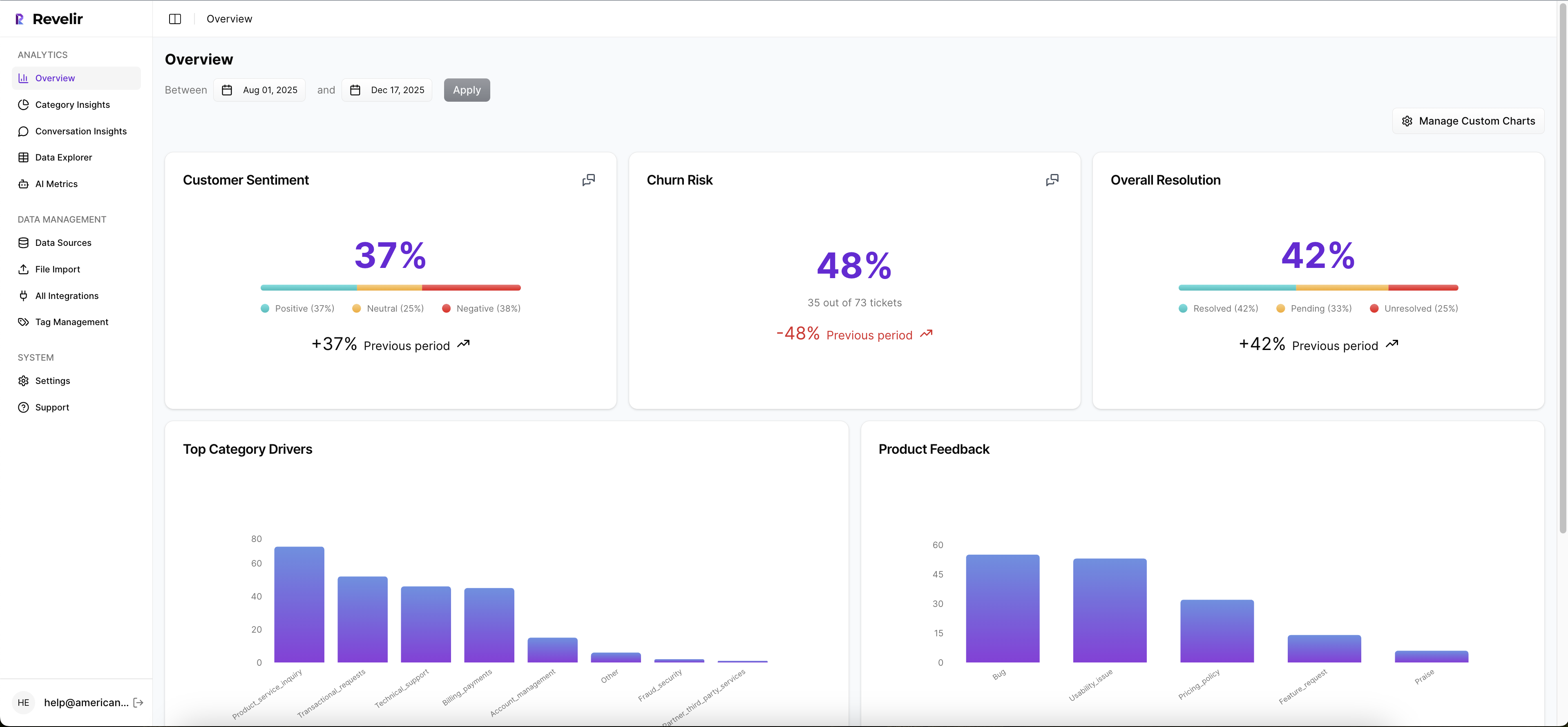
For teams evaluating the best software for small support analytics use cases, Revelir AI is aimed at a narrower but important job: verifiable insight from support conversations. It analyzes 100 percent of conversations, structures them into usable AI metrics, and ties each pattern back to the ticket evidence.
Revelir AI differentiators for evidence-backed analysis
The core difference is trust architecture. Revelir AI turns tickets into structured metrics like sentiment, churn risk, effort, drivers, and product feedback, then lets teams drill into the exact conversations and quotes behind those patterns. For small teams, that closes the gap between "we saw a trend" and "we can defend this in a meeting."

A support lead can filter negative sentiment in Data Explorer, run analysis by Category Driver or Canonical Tag, click into a spike, and validate it through Conversation Insights. That top-down then bottom-up workflow matters. It mirrors how real decisions get made. You start with the pattern, then you ask whether the examples hold up. If they do, you act.
This is where the market splits. Some tools are optimized for scores. Some for automation. Some for broad VoC aggregation. Revelir AI is optimized for evidence-backed metrics from support conversations. That’s narrower than full VoC. It’s also sharper if your team lives inside tickets.
If you want to see how that looks in practice, Learn More.
Who should choose Revelir AI first
Revelir AI is a strong fit for CX, product, and support teams that need audit-ready insight without building a giant analytics program first. If your weekly question is "what’s driving this issue, who’s affected, and where are the tickets," the fit is strong. If your weekly question is "how do we automate returns," choose differently.

Use the Evidence Threshold Rule:
- If leadership asks for source proof, prioritize traceability.
- If you review only samples today, prioritize full coverage.
- If current dashboards show scores but not drivers, prioritize structured metrics.
- If rollout must happen fast, prioritize CSV or Zendesk ingestion over custom modeling.
That won’t fit everyone. Broad omnichannel research teams may prefer a wider VoC platform. Ecommerce brands chasing containment may prefer an AI agent. But for teams that need support insights they can actually defend, this is a cleaner match.
Later, once you want to map your own business language into the analysis, custom AI metrics and taxonomy controls become important too. That’s where the platform gets more strategic, not just descriptive.
Which Platform Is the Best Fit by Team Size and Use Case
Choosing the best software for small support teams comes down to team shape, budget range, and the kind of weekly question you need answered. Small Zendesk teams often need speed. Growth-stage support orgs need stronger analytics. Cross-functional programs need breadth. Teams that must prove findings need traceability.
[Table: Platform] — See "Table Embed Codes" in Oleno to copy the HTML for this table.
Most teams can narrow the field with one question: do you need live operations, broader VoC, automation, or evidence-backed support intelligence? Once you answer that, the shortlist gets a lot cleaner.
qvasa fits small Zendesk-first teams that want light operational visibility. SentiSum fits growing support orgs with bigger budgets and appetite for broader AI analytics. SupportLogic fits mature enterprise support operations. Siena fits ecommerce automation. Chattermill fits centralized CX programs.
Revelir AI fits the team that’s tired of sampled reviews, score-watching, and arguments over whether a chart is real. It analyzes 100 percent of support conversations, applies custom AI metrics in your business language, and lets you drill from a pattern to the ticket evidence behind it. If that’s the gap you’re trying to close, it belongs on the shortlist.
The short version is simple. Buy qvasa for operational Zendesk monitoring. Buy Siena for ecommerce automation. Buy Chattermill for broad VoC. Buy SupportLogic for enterprise support ops. Buy SentiSum if you want scaled AI analytics and can support the budget. Buy Revelir AI if your team needs support insight you can verify, defend, and act on.
Frequently Asked Questions
How do I analyze customer support tickets with Revelir AI?
To analyze customer support tickets using Revelir AI, start by integrating it with your helpdesk, like Zendesk. This allows Revelir to ingest all your support conversations automatically. Next, use the Data Explorer feature to filter and group tickets based on key metrics like sentiment, churn risk, and customer effort. You can drill down into individual tickets to see detailed insights, including AI-generated summaries and assigned tags. This process helps you identify patterns and root causes of customer issues quickly.
What if I need to upload historical tickets to Revelir AI?
If you need to upload historical tickets, you can use the CSV ingestion feature in Revelir AI. Simply export your tickets from your helpdesk as a CSV file and upload it through the Data Management section. Revelir will parse the transcripts and apply its full tagging and metrics pipeline, allowing you to analyze past conversations just like ongoing ones. This is great for backfilling data and ensuring you have a complete view of your support history.
Can I customize metrics in Revelir AI?
Yes, you can customize metrics in Revelir AI using the Custom AI Metrics feature. This allows you to define domain-specific classifiers tailored to your business needs, such as identifying upsell opportunities or specific reasons for churn. You can create custom questions and value options, and the results will be stored as columns that you can use across filters and analyses. This flexibility ensures that the insights you gain are relevant and actionable for your team.
When should I use the Analyze Data feature in Revelir AI?
You should use the Analyze Data feature in Revelir AI when you want to summarize metrics like sentiment and churn risk by different dimensions, such as driver or canonical tag. This tool allows you to create interactive tables and stacked bar charts that link directly to the underlying tickets. It’s particularly useful when you need to present findings to stakeholders or need to validate patterns in your support data quickly.