

Most teams can surface issues from ticket clusters. Then it stalls. If you want behavior change, you need a consistent artifact that moves from insight to action fast. Auto-generate agent coaching briefs from those clusters so managers stop reinventing the message every week and agents practice the same moves. Otherwise, the queue keeps repeating the same mistakes.
We’ve watched managers improvise from a blank doc, under pressure, with uneven evidence. It feels productive. It isn’t. A short, standardized brief with quotes, model phrasing, and actions makes the difference. You publish it on a steady cadence, measure the shift, and retire what doesn’t move the metric. Simple. Repeatable. Defensible.
Key Takeaways:
- Define a single coaching brief template with objectives, evidence, model phrasing, and actions
- Cluster tickets by drivers and segments, then pull three representative quotes you can verify
- Tie every brief to 1-2 metrics you can measure next week and next month
- Keep briefs to five-minute huddle length and push them where work happens
- Run A or B pilots and track repeat contacts, sentiment delta, and adherence in QA
- Use full-coverage analysis and traceable quotes to remove debate and speed adoption
Auto-Generate Agent Coaching Briefs Or Watch Insights Stall Out
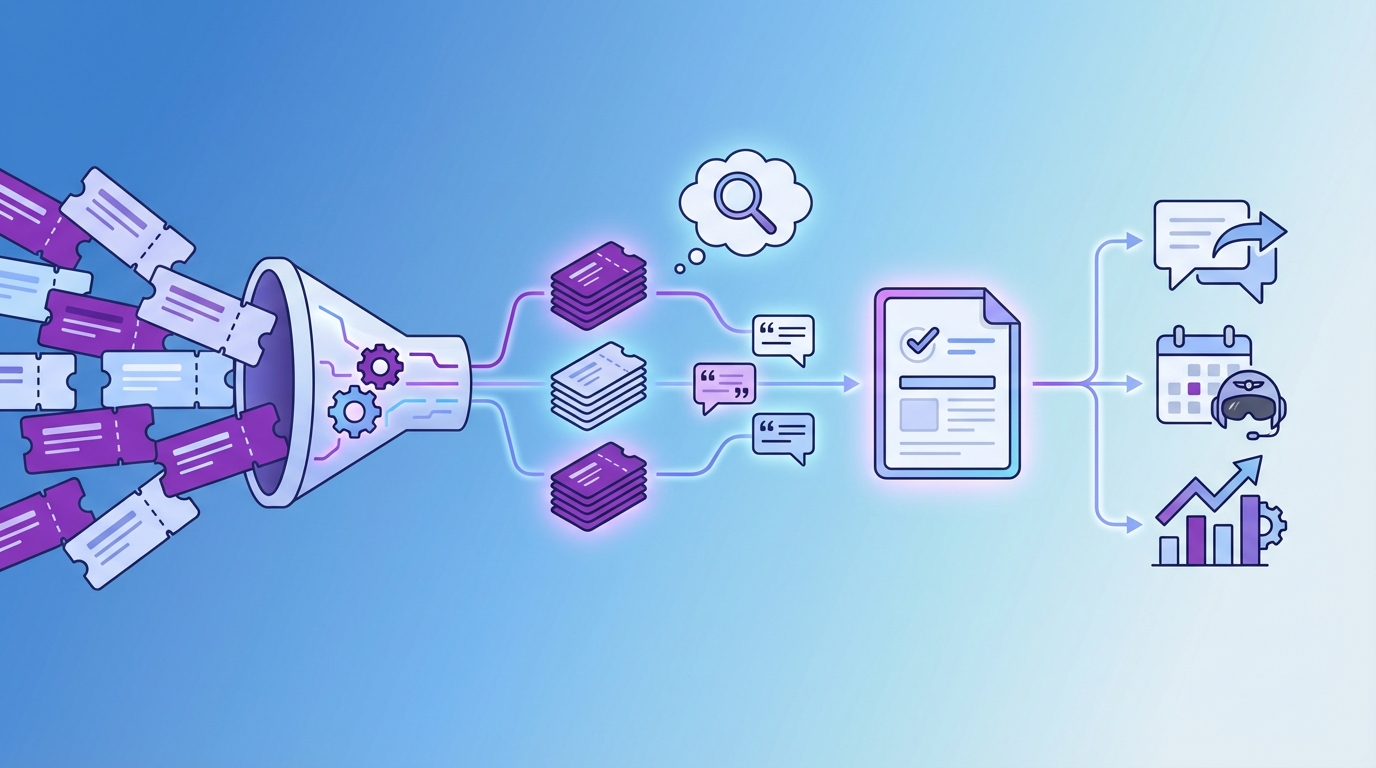
Auto-generated coaching briefs turn insights into consistent action. They convert noisy clusters into a short playbook that managers can teach tomorrow and agents can practice today. Without that output, insights die in meetings and behavior change fails to reach the queue. The fix is a standard, lightweight brief you can ship weekly.
Why Insights Rarely Become Coaching
Most teams can find drivers and hot tickets. The trouble starts at the handoff. Managers open a blank doc, hunt for examples, and write one-off guidance that drifts by team and by week. The message changes, the evidence is soft, and the queue learns mixed habits. You feel busy, but the same problems return.
The pattern looks familiar: a dashboard screenshot, a few anecdotes, and a list of ideas. Nobody owns the artifact that lands in standups. That gap is where change fails. A shared, concise brief removes friction. It embeds the driver, real quotes, a model response, and three actions to practice. Managers lead with proof, not slides.
When you ship the same format every week, QA and enablement can track outcomes. You stop debating anecdotes and you start measuring behavior. Honestly, that’s the shift most teams miss.
What Auto-Generated Briefs Solve
Automatic briefs reduce prep time and make the message consistent. They carry the same structure every week, so managers focus on coaching, not formatting. Evidence is verifiable, which keeps adoption high. Agents hear one clear path, not five opinions.
They also shorten the loop from pattern to practice. No ad hoc sprints to find quotes. No last-minute edits. The artifact lands in the channel, reads in five minutes, and anchors a quick role-play.
When volume spikes, you still get coverage. You won’t miss quiet but costly patterns. And you avoid the waste of rebuilding the same content by hand.
Reframe Your Inputs Into Teachable Behaviors
Coaching briefs work when they teach specific moves and tie to real metrics. Start with the outcomes you need, then map drivers to behaviors that agents can model, practice, and verify. Use quotes as evidence so skeptics can click through and see context. If you can’t measure it, you can’t coach it.

Define Coaching Objectives And Metrics First
Pick the goals before you write a single word. Resolution time, repeat contacts within seven days, and sentiment delta pre to post interaction are strong starting points. Add one or two business metrics leaders already watch. Write these at the top of every brief so there’s no confusion about what success looks like.
If you can’t measure it next week, it’s the wrong objective. The brief should name a small set of actions that plausibly move those numbers. Keep it narrow and coachable. We’ve seen teams try to teach five things at once. That fails. Focus wins.
Then set expectations for how you’ll check progress. QA adherence to model phrasing, correct resource use, and right-path deflections are practical leading signals. Tie them to the lagging results you report upstairs.
A simple way to keep yourself honest is this: can you pull the before and after view in minutes, without a spreadsheet hero?
- Leading signals to track once the brief ships:
- Adherence to model phrasing in QA, sampled across the cohort
- Correct use of the linked resource or workflow
- Deflection to the right channel or policy on first try
What Counts As Evidence You Can Coach Against?
Use representative quotes you can stand behind. One clean failure, one near miss, one ideal response. Keep each short and annotated so a manager can teach from it in five minutes. Make the agent decision point obvious. Evidence should link back to the exact ticket, so anyone can verify context instantly.
You’re not trying to win a debate. You’re trying to teach a behavior. Quotes turn vague advice into concrete moves. And they stop meetings from drifting into opinion wars. If someone asks, “Where did this come from,” you can open the ticket on the spot.
Research on modern agent enablement supports this approach. Teams that pair clear guidance with real examples retain skills better and adapt faster, as noted in Zendesk’s discussion of AI-powered ticketing.
The Cost Of Not Learning To Auto-Generate Agent Coaching Briefs
Manual curation burns hours and still misses the signal. Consistency breaks down across managers. You feel the cost in repeat contacts, slow ramp, and uneven sentiment recovery. Let’s pretend you can afford it. You can’t. The waste compounds weekly and hides the real problem.
Let’s Quantify The Manual Tax
Let’s pretend your team handles 1,000 tickets a month. Sampling 10 percent at three minutes each costs five hours just to skim. Add two hours to assemble examples and another hour per manager to tailor guidance. You’re already into double digits weekly, and you still miss edge cases that drive churn risk.
Those hours have a second cost. They delay action. Signals arrive late, skepticism grows, and the team spends more time arguing than practicing. When coaching lands a week after the spike, frustration rises and confidence falls. Studies on assisted support show that timely, targeted guidance improves outcomes, which is hard to deliver if you are slow to brief. See the ACM study on agent assistance for context.
Now look at ramp time. Without a consistent brief, new hires learn conflicting habits. That turns into expensive rework and QA disputes. You pay for it twice.
Where Consistency Breaks Down And Which Metrics Prove Change
When managers build their own decks, phrasing drifts. One team softens a risky behavior. Another overcorrects. Agents get mixed signals and hesitate on live calls. That hesitation shows up as longer handle times and repeat contacts. It’s a preventable mistake.
Fix it with a single, templatized artifact and a small set of shared metrics. Use leading signals to guide coaching this week and lagging signals to prove change next month. Keep the review simple and repeatable.
- Leading signals to review weekly:
- QA adherence to model phrasing
- Correct resource linking
- Right-path deflections
- Lagging signals to review monthly:
- Repeat contacts for the driver within seven days
- Handle time variance by cohort
- Post-contact sentiment shift
What It Feels Like To Coach Without A System
Coaching from scratch feels busy and important. It’s actually a grind. Managers juggle fire drills and slide decks, while agents hear different advice per shift. Confidence erodes, and customers feel it. A standard, auto-generated brief reduces the noise and gives everyone a shared playbook.
For Managers, The Hidden Burnout
You’re triaging fires, stitching slides at night, and fielding challenges like “show me the example.” It’s exhausting. The context switching and the fear that your guidance missed the mark wear you down. A small, repeatable brief relieves that pressure. You lead with quotes, not hunches, and you reuse a format that takes minutes, not hours.
There’s a credibility bonus too. When every claim links to a ticket, objections fade. You move faster from discussion to decision. That’s what you need when volume spikes. Not more meetings. Proof you can open in one click.
For Agents, The Confusion Loop
Agents live with the consequences of mixed messages. One manager prefers empathy-first. Another pushes speed. On a live call, that conflict creates hesitation. Over-explaining creeps in. Docs get searched mid-chat. Customers sense the wobble and lose patience.
Briefs fix this by specifying model phrasing and three actions to practice. You give agents a clear script to try and a target to hit. Confidence returns. So do smoother calls. For training context, see CMSWire’s look at agent training in AI-enabled teams.
How To Auto-Generate Agent Coaching Briefs With A Repeatable Pipeline
The pipeline is simple. Cluster tickets into themes you can coach, pull verifiable quotes, generate a concise brief, and deliver it where work happens. Then schedule a pilot and measure the shift. Do it the same way every week. Consistency beats creativity here.
Cluster Tickets Into Coaching Themes
Start with structure. Use canonical tags and drivers to group tickets, then refine with topic labels when volume is high. Keep clusters specific, for example onboarding for enterprise accounts in chat. Validate the slice, then save the view so you can reuse it next cycle.

Make sure the theme translates into teachable behaviors. “Onboarding friction” is not a behavior. “Confirm environment, narrate next step, link exact doc” is. If the cluster is too broad, break it down until the moves are clear.
Now turn that slice into a weekly coaching theme with these steps:
- Open your analysis workspace and filter by driver, segment, and sentiment.
- Use grouped analysis to confirm volume and severity across categories.
- Save a named view for the theme so you can revisit it next week.
- Sanity check the slice by opening a few tickets for context.
- Write the working title of the brief to reflect the behavior you will coach.
Extract Canonical Quotes And Actions
This is where you build trust. Open a handful of tickets in the slice. Pull one failure, one near miss, and one gold standard. Highlight the agent decision that mattered and the customer words that signal risk or confusion. Keep the snippets short and ready to paste into the brief.

You’re looking for teachable moments, not drama. Choose examples that match the pattern you want to change. Then write one action per quote that an agent can practice tomorrow.
Follow a tight pull-and-annotate loop:
- Copy the quote and link back to the ticket for verification.
- Annotate the agent decision point and what to do differently.
- Add a model response that matches your brand voice.
Deliver, Schedule, And Measure The Loop
Push the brief where work happens. Post to the team channel, attach it to QA workflows, or load it into your LMS. Keep the artifact to one or two pages so it works in a five-minute huddle. Then schedule a pilot and measure the change on a tight timeline.
You don’t need a big program. You need a repeatable cycle. We’ve seen small pilots create fast proof, which makes the next brief easier to adopt.
To keep momentum without drama:
- Set a weekly cadence and publish day.
- Define cohort rules, for example new hires or a specific queue.
- Run a two-week A or B pilot on one theme.
- Track repeat contacts and sentiment delta for that slice.
- Keep the briefs that move the metric and retire the rest.
Want to see this pipeline on your data? See how Revelir AI works
How Revelir AI Helps You Auto-Generate Agent Coaching Briefs At Scale
Revelir AI processes 100 percent of tickets, structures them with tags, drivers, and AI metrics, and links every insight to the exact conversation. That coverage and traceability feed your weekly themes, your quotes, and your measurement loop. You go from cluster to coaching brief in minutes, and you can prove the impact without exports.
Full-Coverage Signals And Drivers Feed Your Themes
Revelir AI reviews every conversation automatically. It assigns raw and canonical tags, rolls them up under drivers, and computes signals like Sentiment, Churn Risk, and Customer Effort. That means your clusters reflect reality, not a sample. You can pivot by driver, sentiment, or risk to pick the most urgent theme quickly.
This also eliminates the manual tax you felt earlier. No more five-hour sampling sprints that still miss the signal. You see the full picture and act with confidence.
- Full-Coverage Processing: 100 percent of tickets are analyzed without sampling, so early patterns are not missed.
- AI Tagging And Metrics: Raw and canonical tags plus AI metrics create a structured dataset you can slice in seconds.
- Drivers For Clarity: High-level drivers help you report in language leadership understands and prioritize at the right level.
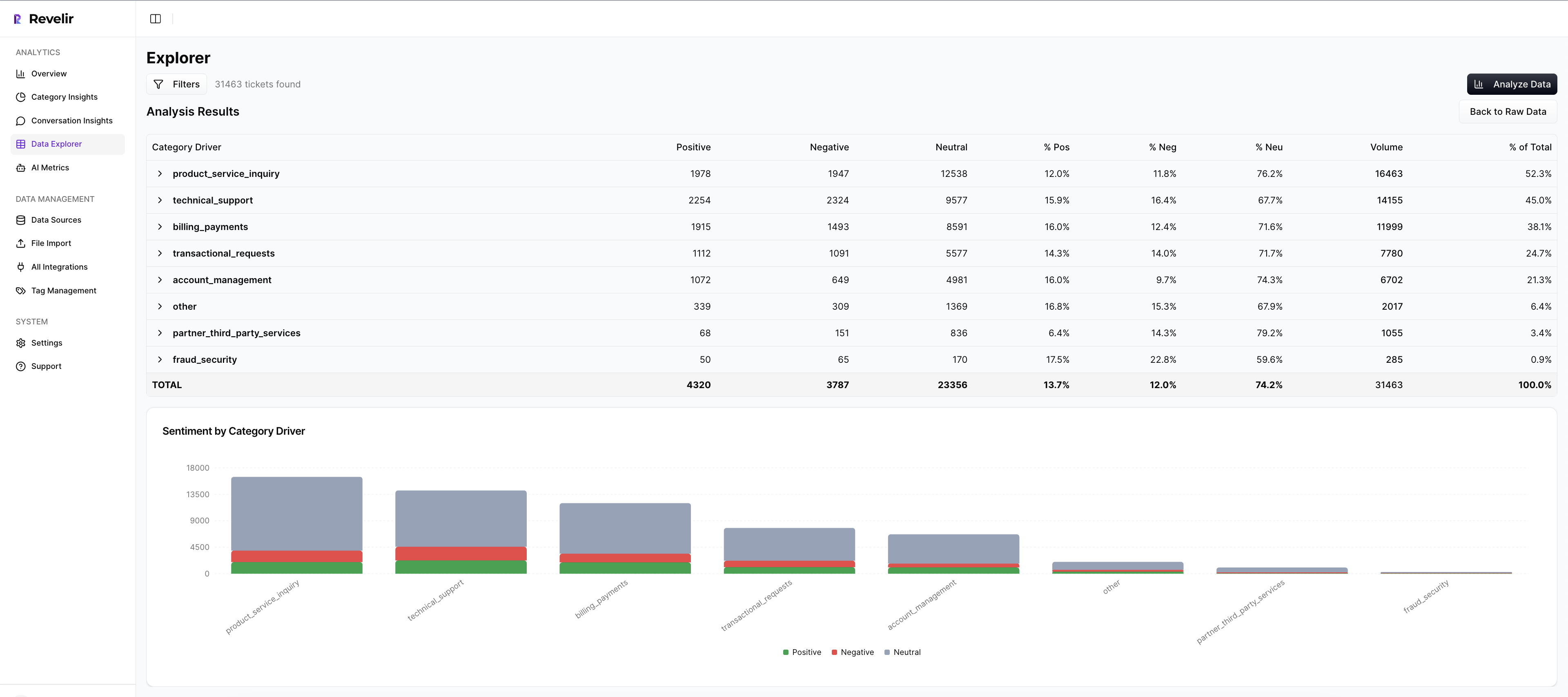
- Analyze Data For Scale: Group metrics by driver or category to confirm volume and severity before you brief.
Conversation Insights For Verifiable Quotes
Every chart and count in Revelir links back to the exact conversations behind it. Inside Conversation Insights, you can open transcripts, read AI summaries, and inspect assigned metrics and tags. Managers grab failure, near miss, and gold examples in one place and paste verified quotes straight into the brief.
This is how you remove debate in coaching sessions. If someone asks for proof, you open the ticket and show context. Adoption improves when evidence is easy to see.
Data Explorer To Segment, Pilot, And Measure
Data Explorer is where you work day to day. Filter by date, segment, and signals. Group by driver or category to isolate a theme, then save standard views for your weekly cadence. After you ship the brief, revisit the same slice and compare repeat contacts, sentiment shifts, and handle time.
You close the loop without leaving the workspace. That makes pilots practical and measurement routine. Research on spaced practice and feedback loops shows better retention when learning and measurement stay close, as noted in journal research on learning and retention.
3x faster theme selection and evidence gathering. That is the practical outcome here. Learn More
Conclusion
Auto-generated coaching briefs turn messy signals into teachable behaviors, backed by quotes you can verify. When you define objectives first, map drivers to specific moves, and publish on a cadence, you stop the repeat-contact spiral. You also give managers a defensible artifact and agents a clear path to practice.
Revelir AI makes this loop sustainable. Full-coverage processing feeds your themes. Conversation Insights gives you the quotes that hold up under scrutiny. Data Explorer measures the shift without exports. If you are ready to move from slideware to skill change, start with one theme, one cohort, and a two-week pilot. Then keep what moves the metric.
Want the same workflow without the manual tax? Get started with Revelir AI (Webflow)
Frequently Asked Questions
How do I auto-generate agent coaching briefs with Revelir AI?
To auto-generate agent coaching briefs using Revelir AI, start by defining a coaching brief template that includes objectives, evidence, model phrasing, and actions. Next, cluster your support tickets by drivers and segments, pulling three representative quotes from these clusters that you can verify. Finally, link each brief to 1-2 measurable metrics that you can track in the following weeks. This structured approach helps ensure that insights are actionable and consistently communicated to your team.
What if I need to refine my ticket tagging system?
If you need to refine your ticket tagging system, you can start by reviewing your existing tags in Revelir AI. Use the hybrid tagging system to map messy raw tags into meaningful canonical categories. This process allows you to clean up redundant tags and ensure that the tagging aligns with your business language. Over time, Revelir will learn these mappings, improving the accuracy of your tagging system and ensuring that future raw tags are categorized correctly.
Can I track customer sentiment over time?
Yes, you can track customer sentiment over time with Revelir AI. The platform automatically analyzes every support conversation and assigns a sentiment label—positive, neutral, or negative—to each ticket. You can use the Data Explorer feature to filter tickets by date range and sentiment, allowing you to see trends and changes in customer sentiment. This helps you identify potential issues early and take action to improve customer experience.
When should I use Conversation Insights?
You should use Conversation Insights when you want to validate the metrics provided by Revelir AI. This feature allows you to drill down into individual tickets, view full conversation transcripts, and inspect the AI-generated summaries and metrics. By reviewing a sample of tickets from key segments, you can confirm that the AI classifications align with your expectations and adjust your tagging or metrics as needed. This step is crucial for ensuring the accuracy and reliability of your insights.
Why does my team need evidence-backed metrics?
Your team needs evidence-backed metrics because they provide a trustworthy foundation for decision-making. Revelir AI processes 100% of your support conversations, ensuring that insights are based on complete data rather than samples. This eliminates bias and allows you to connect insights directly to the actual conversations that generated them. By using evidence-backed metrics, you can confidently prioritize product fixes, improve customer experience, and justify decisions to leadership.