

If you’re relying on churn-risk flags to save accounts, you’re already late. A flag is a clue, not a cure. The save happens when your team moves tight, within 48 hours, with proof attached to every decision so people stop debating and start fixing.
Here’s the shift. Treat churn-risk as an operational runbook with timers, owners, and verification, not a chart you review next week. Use your helpdesk for action and your analytics for prioritization and evidence. Keep the loop tight and visible. When the clock is public, queues move. And when quotes are attached, prioritization stops being a fight.
Key Takeaways:
- A churn-risk flag isn’t a rescue, build a 48-hour workflow with owners, scripts, and verification
- Define risk consistently (signals, examples, non-examples) so agents act fast without over-tagging
- Prioritize by value and recency first; drivers expose fixable patterns you can address this week
- Quantify costs: slow triage burns engineering hours, inflates reopens, and hits ARR
- Make traceability non-negotiable, every number links to exact conversations and quotes
- Run a simple rubric, tune weekly, and publish SLAs so leaders give air cover and teams move
Why Churn-Risk Flags Do Not Save Accounts By Themselves
Churn-risk flags don’t save accounts because labels aren’t workflows. Teams need a 48-hour operating rhythm that turns signal into action with evidence. The work lives in your helpdesk; the prioritization and proof live in analytics. When both connect, leadership sees progress instead of noise.

The metrics you watch are not the workflow you need
Most teams watch sentiment and churn-risk trends and assume the system will nudge outcomes. It won’t. Metrics are prioritization tools; they don’t define who moves, when, or how you’ll prove it happened. You need a lightweight runbook that says exactly what gets done in 0–8, 8–24, and 24–48 hours, by role, with a verification step baked in.
We’ve seen the same pattern play out: a spike in negative sentiment turns into a dashboard tour, then a round of “let’s read some tickets.” Useful, but slow. The fix is moving earlier and simpler. Decide the few actions that matter in the first two days, acknowledge, scope, stabilize, escalate with evidence, and make those actions visible in your helpdesk. Analytics should prioritize and validate, not replace movement.
Do three things well and the rest follows:
What counts as a churn-risk ticket?
If “churn-risk” is fuzzy, you get over-tagging and false alarms. If it’s too narrow, you miss saves. Create a definition agents can apply in seconds. It’s usually a combination of explicit risk language and contextual severity. You want signals that reliably predict attrition, not just frustration.
Practical criteria help. Think explicit cancel mentions, unresolved high-effort threads, repeated billing confusion from high-value accounts, or a CSM note about a usage dip. Same thing with account context, Enterprise or high ARR tiers get a heavier weight. Publish 5–8 examples and a few non-examples so nobody’s guessing.
Consistency beats perfection. You’re aiming for a trustworthy threshold where, if you read a handful of tickets, the classification “makes sense.” That’s enough to move quickly and refine over time.
A workable starter set of signals:
Why a 48 hour clock changes behavior
Timeboxing forces prioritization and clean handoffs. When the team commits to 0–8, 8–24, and 24–48 hour milestones, work clusters into actions people can complete in one sitting. It reduces ambiguity. It also creates a visible SLA leaders can defend, which is how you keep the queue from turning into a graveyard.
Make the clock public. Put timers in views, review them in standup, and measure time-to-first-response and time-to-verification for churn-risk tickets. The effect is simple: agents move faster, escalations don’t languish, and conversations don’t drift into “sorry for the delay” territory. Guidance from resources like the GitLab Support Handbook on triage and Tidio’s triage guide makes the cadence easy to adopt in real queues without reinventing process.
The Real Bottleneck Is Your 48 Hour Operating Rhythm
Most triage misses the accounts that matter because it optimizes for volume, not value and recency. You need a shared queue that floats high-ARR risk to the top, groups by drivers to reveal clusters, and makes every decision auditable. When the rhythm is tight, saves rise and debates fall.

What traditional triage misses in high value accounts
Volume-based triage buries critical risk. You clear easy items first and rationalize later. The fix is adding value and recency to the sort. Give accounts on Enterprise or top-tier plans priority, and bias toward tickets created in the last 48 hours. That’s where the window to save is still open.
Group by drivers like Billing and Account Access to spot clusters that are actually fixable. Ten similar access issues? That’s a stabilizing script and a policy check. Three scattered bugs? That’s escalation with evidence. The goal isn’t a perfect taxonomy, it’s fast identification of patterns you can address this week.
Teams that adopt a triage grid or value-based scoring see the queue differently. They stop asking “How many?” and start asking “Which ones right now?” Resources such as InvGate’s triage approach highlight how adding business impact to priority changes outcomes without more headcount.
Traceability builds trust across support and product
If a decision can’t be traced to a ticket and a quote, it will be challenged. That’s healthy skepticism. The antidote is building traceability into your operating rhythm. From any chart or segment, you should be one click from the underlying conversations, and one copy-paste from the quote that explains the “why.”
Capture that quote in the escalation notes. Add the driver and the relevant tags. Then when a PM or CSM asks for context, nobody’s hunting. Trust rises because stakeholders can verify source in seconds. This is how you move past anecdotes and into decisions that stick.
Traceability also keeps you honest. If the quote doesn’t match the label, you’ll find out fast and refine definitions. Over time, the loop gets cleaner: better labels, clearer drivers, less debate, faster fixes.
The Hidden Costs Of Slow Churn Triage
Slow triage isn’t just a delay; it’s an expensive loop. Engineering gets pulled into fire drills, reopens spike, and ARR quietly erodes. Quantify it. Track incidents that originated in unresolved high-risk tickets. Tie reopens to first-48-hour behaviors. You’ll see the pattern, and it won’t be flattering.
Engineering hours lost to avoidable escalations
When churn signals sit, bugs and policy issues escalate upstream. Engineers get pulled into Slack threads mid-sprint, asked to debug without context, and then to hot-fix the wrong thing. That is frustrating rework. It burns hours, kills focus, and corrodes trust in the queue.
Start tracking a simple lineage: unresolved high-risk ticket → escalation → engineering time consumed. If you do this for a month, you’ll see where slow triage injects chaos. A playbook that stabilizes in 0–8 hours reduces hot-fix demand and turns “emergency” into “scheduled.”
Once you instrument the queue, you can compare sprint velocity on weeks with and without late escalations. The difference is often multiple engineer-days. That’s backlog you could have shipped.
The compounding impact on ARR and re open rate
Delayed responses increase reopens, which drag sentiment lower, which makes churn more likely. There’s a straight line from slow outreach to lost revenue. Watch MTTR specifically for churn-risk tickets, plus 30-day retention lift for accounts that got the 48-hour playbook versus those that didn’t.
If reopens climb, you don’t need another dashboard, you need better 0–8 hour scripts and verification checks. Acknowledge impact, confirm scope, set a next-update time, and verify contact channel. These are small moves with outsized effects on reopens and tone.
Service levels matter here. Guardrails like those in Gorgias’ SLA best practices keep expectations clear so your first reply lands confidently, not defensively.
Let’s pretend you delay triage by one week
Let’s pretend you process 50 high-risk tickets per week and 20% are high-value. A one-week delay means 10 high-value accounts wait. If even two slip to churn, you’ve lost hundreds of thousands in ARR depending on contract size. You also just burned 20–30 engineering hours on avoidable fire drills.
Small lags create outsized losses. It’s not the dramatic cases that get you; it’s the quiet ones that slip through because nobody was checking the right view at the right time. A 48-hour rhythm is a revenue and morale policy, not a support preference.
When A Risk Lingers, Everyone Feels It
Lingering risk spreads. It derails product, strains relationships, and drains your team. You’ve seen it. A single thread consumes an afternoon because evidence is missing and ownership is unclear. The cure is boring: timers, scripts, quotes attached. Boring is good. It wins.
The 3pm Slack thread that derails the sprint
You know the one. A customer threatens to cancel. Leaders get pinged. Product is asked for a reason and a fix. Without evidence attached to the risk, debate starts. Someone scrolls for examples. Half the team loses an hour.
A tight 48-hour cadence, with quotes and drivers captured at the source, avoids the scramble. The thread shortens to: “Here’s the driver, here are the three quotes, here’s what we did in the first 8 hours, and here’s the next step we need from product.” People go back to work. The sprint continues.
What happens when your champion churns before you call?
Champions change roles. Silence is not neutral. If your first outreach lands days late, the narrative hardens and your window to reset expectations closes. A simple first reply within 2 hours, acknowledge the impact, share a verification step, offer a call slot for high-value accounts, buys time and trust.
Slow starts turn winnable saves into polite declines. This isn’t about fancy automation. It’s about making the first human move quickly and credibly, then following through inside 48 hours.
A 48 Hour Playbook Your Team Can Run This Week
A workable 48-hour playbook starts with shared views and a simple rubric, then moves fast with micro scripts and clean handoffs. You’re not chasing perfect taxonomy, you’re creating speed and proof. Keep your definitions tight, your timers visible, and your verification step explicit.
Detect and score with shared views
Create saved views that stack filters: churn risk = yes, sentiment = negative, effort = high, unresolved status, and plan tier for account value. Add a “created within 48 hours” filter to prioritize fresh risk. Group by driver to spot clusters worth a stabilizing script or policy check.
Score with a lightweight rubric that weights churn signals, account value, and recent actions. Example weights: churn signal (2), negative sentiment (1), high effort (1), enterprise tier (2), recent usage drop noted by CSM (2). Start with a cutoff score of 4 for immediate action. Review weekly and tune cutoffs based on saves, false positives, and reopen rates.
Two tips that keep this honest:
Execute quickly and escalate smartly
Use micro scripts for the first 0–8 hours: acknowledge impact, confirm scope, verify contact details and environment, set expectations for the next update, and offer a short call slot for high-value accounts. These are one-sitting actions that reduce reopens and stabilize tone.
Between 8–24 hours, assign owners by problem type. Support leads own stabilization and updates. CSMs own relationship risk and expectation management. Product owns confirmed impact summaries. Engineering owns reproducible defects with clear steps and evidence. Use a one-page handoff: problem summary, driver, quotes, requested next step, and a 24-hour check-back with the customer. Operational patterns from the GitLab triage handbook and triage grids like InvGate’s model translate cleanly here without process bloat.
Want to see this cadence in action with your own data? See how Revelir AI works.
How Revelir AI Powers The 48 Hour Workflow End To End
A 48-hour save rhythm needs two things: complete coverage and verifiable context. Revelir AI provides both. It processes 100% of support conversations, turns them into structured metrics (sentiment, churn risk, effort, tags, drivers), and keeps a click-through path to the exact quotes. That’s how you prioritize quickly and defend every decision in the room.
Shared risk queues in Data Explorer
Revelir AI is built around Data Explorer, your primary workspace. Connect Zendesk or upload a CSV and enable columns for sentiment, churn risk, customer effort, canonical tags, and drivers. From there, create saved views that mirror your rubric and value tiers so Support, CSM, and Product pivot the same dataset in real time.

Because processing covers 100% of tickets, you’re not sampling your way into blind spots. You can filter by plan tier, created date, and status, group by driver, and sort by risk in minutes. This is where the 48-hour clock becomes a shared board instead of a hallway conversation.
Evidence attached to every decision
Analytics without traceability invites debate. Revelir’s Analyze Data groups churn risk by drivers, tags, or plan tier and shows interactive counts. Clicking any number opens Conversation Insights where you can read the transcript, review the AI summary, and capture the exact quotes that prove the risk.
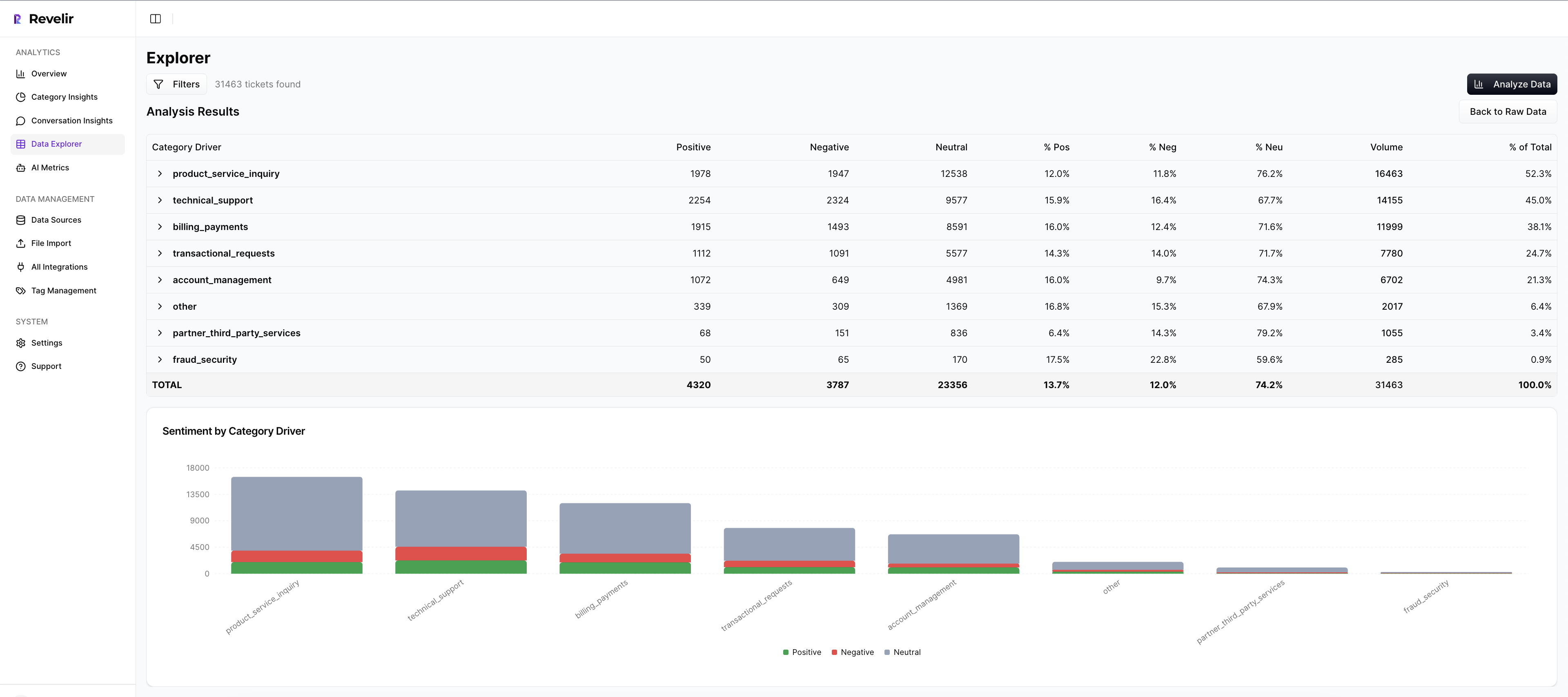
Paste those quotes into your escalation notes. When product asks, “Show me,” you already have it. The effect is predictable: fewer meetings about representativeness, faster prioritization of real fixes, and less time spent stitching screenshots.
Measure and iterate against real KPIs
A save motion lives or dies by its feedback loop. Revelir AI makes measurement straightforward: track MTTR for churn-risk tickets, reopen rate, and 30-day retention lift for accounts that ran the playbook. If you need metrics in existing dashboards, export them via API and bring them into your BI.

As patterns stabilize, refine canonical tags and driver mappings so your reporting uses leadership’s language. Over time, raw AI tags surface emerging issues while canonical tags and drivers keep communication clean. You spend less time arguing categories and more time reducing the churn-risk segments that actually cost you ARR.
If you’re ready to turn flags into saves with evidence at every step, start simple and expand as you learn. Learn More. https://Learn More
Conclusion
Churn-risk flags are the start, not the save. The save happens when your team runs a visible 48-hour rhythm: detect and score the right tickets, move fast with scripts and handoffs, and attach quotes so decisions stand up to scrutiny. Do that, and you’ll see fewer 3pm fire drills, smoother sprints, and measurable retention lift. The loop tightens. The work gets calmer. And the saves stick.
Frequently Asked Questions
How do I prioritize churn-risk tickets effectively?
To prioritize churn-risk tickets, start by categorizing them based on urgency and potential impact. Look at recent customer feedback and identify any high-value accounts that might be at risk. You can use Revelir AI to analyze ticket data and highlight which issues need immediate attention. This helps ensure your team focuses on cases that could save the most significant revenue.
What if I miss the 48-hour window?
If you miss the 48-hour window, don’t panic. First, review what caused the delay—was it a lack of resources, unclear priorities, or something else? Next, communicate with the affected customer promptly. Use Revelir AI to gather insights on their previous interactions and tailor your response. This can help rebuild trust and show that you're committed to resolving their issues, even if late.
Can I automate parts of the triage process?
Yes, you can automate parts of the triage process to speed things up. Set up automated flags for tickets that meet certain criteria, like high churn risk or specific keywords. Revelir AI can help by analyzing patterns in customer interactions and automatically routing tickets to the right team members. This way, you can focus on cases that need human intervention while streamlining the workflow.
When should I involve leadership in churn-risk cases?
Involve leadership in churn-risk cases when you see patterns emerging or if a high-value account is at risk. Regular check-ins can help leaders stay informed about churn trends and the effectiveness of the actions taken. Using Revelir AI, you can gather data and insights that make it easier to present your findings. This ensures leadership understands the urgency and can provide the necessary support.
Why does clear communication matter with churn-risk tickets?
Clear communication is crucial with churn-risk tickets because it helps manage customer expectations and builds trust. When customers see that you're actively addressing their concerns, they feel valued. Use tools like Revelir AI to keep track of all interactions and decisions made on these tickets. This way, you can provide consistent updates and demonstrate that you’re taking their issues seriously.