
If you’re choosing between Revelir AI and SupportLogic, you’re usually deciding what you want to optimize for: evidence-backed analytics you can defend in a product prioritization meeting, or an operations-heavy Support Experience setup built around QA, coaching, and proactive risk signals. Both can be “right.” They just solve different headaches.
The Big Differences Between Revelir AI And SupportLogic
Revelir AI and SupportLogic differ most in what they’re trying to improve day to day: Revelir centers on turning every support conversation into structured, auditable metrics, while SupportLogic centers on reducing escalations and improving agent performance through QA and assist. SupportLogic also documents a managed data pipeline and refresh cadences via its Data Cloud (SupportLogic Data Cloud). In practice, that means SupportLogic often sits closer to support operations, while Revelir tends to sit closer to CX and product insight.

Quick Comparison Snapshot
If you only read one section, read this one. These two platforms can both analyze support conversations, but they usually get bought for different outcomes. SupportLogic leans into auto QA, coaching, and assist workflows, while Revelir leans into analysis you can drill into, validate, and bring to stakeholders with the receipts.
You’ll see the tradeoff fast if you ask a simple question like, “What’s driving negative sentiment among enterprise customers this month?” Revelir is built to pivot, group, and then click straight into the underlying conversations. SupportLogic is built to detect risk patterns and improve how support responds.
| Category | Revelir AI | SupportLogic | What it means |
|---|---|---|---|
| Primary focus | Evidence-backed analytics on 100% of support conversations; flexible taxonomy and metrics | Support Experience platform for proactive risk reduction, AutoQA, and agent assist | Decide between analytics/reporting depth vs. operations/QA and agent guidance |
| Data refresh | Ongoing processing of imported tickets; explore via Data Explorer/Analyze Data | Data Cloud refresh: raw ~6 hours; UI ~24 hours (per SupportLogic) (SupportLogic Data Cloud) | SupportLogic publishes refresh cadences; Revelir centers on continuous analysis workflows |
| Tagging and metrics | Sentiment, Churn Risk, drivers, frustration signals, product feedback; custom metrics and taxonomy | Predictive escalation/churn signals and conversation insights (SupportLogic Data Cloud) | Revelir emphasizes taxonomy control and custom metrics; SupportLogic emphasizes predictive ops |
| QA/agent assist | Not a QA or agent-assist platform | AutoQA and agent assist with cited answers (precision RAG) (SupportLogic Precision RAG Event) | If you need QA/assist, SupportLogic fits; if you need auditable analytics, consider Revelir |
| Evidence and traceability | Every metric and chart links back to source conversations and quotes | Focus on proactive signals and coaching; not positioned around audit-traceable rollups (SupportLogic Data Cloud) | Revelir prioritizes auditability for cross-functional stakeholders |
| Pricing transparency | Not publicly listed | Custom/quote-based; no public list prices | Expect sales-led procurement for both |
Key Takeaways:
- If you need AutoQA, scorecards, and agent coaching workflows, SupportLogic is built for that operations motion (SupportLogic Data Cloud).
- If you need insight rollups you can prove with source tickets and quotes, Revelir is designed around traceability and drill-downs.
- SupportLogic documents a managed data pipeline with stated refresh cadences (raw about 6 hours, UI about 24 hours) (SupportLogic Data Cloud).
- Both tools often require sales-led pricing conversations, so budgeting usually starts with scoping your data sources and team size.
Why This Decision Matters For Support And Product Teams
This decision matters because your tooling becomes your “source of truth” for what customers are struggling with, and that influences roadmap, staffing, and churn risk mitigation. If the system can’t show evidence, leadership debates anecdotes; if it can’t drive operational change, support stays stuck in reactive mode. The right choice depends on whether you need auditable insight for product decisions, or execution muscle for QA and coaching.
The Hidden Time Tax Of Manual Reviews
Manual review is where good intentions go to die. It starts as “let’s just sample 50 tickets a week,” and then suddenly you’re spending real hours on partial coverage while everyone still argues about whether the sample was representative.
Let’s pretend you’re handling 1,000 tickets a month. Sampling 10% at three minutes each sounds reasonable until you do the math: that’s five hours for a view you still can’t fully trust. Reviewing everything at the same pace jumps to 50 hours. Nobody’s checking that tradeoff in the planning meeting, but you feel it every week in frustrating rework.
And it’s not just time. It’s confidence. When you walk into a product meeting with “customers are mad about onboarding,” the first question is always, “Show me.” If you can’t link the insight to the exact conversations, you end up stitching together screenshots and cherry-picked quotes. That’s how insight programs lose credibility.
Implementation Lift And Change Management
Implementation is where tools either become part of the workflow or become shelfware. It’s usually not the integration itself that breaks teams, it’s the change management: who owns taxonomy, who trusts the metrics, and who’s on the hook to answer, “Why did the trend change?”
SupportLogic positions a managed pipeline through SupportLogic Data Cloud, including published refresh cadences (SupportLogic Data Cloud). That’s useful, but it also signals a more enterprise-style rollout where you’ll care about data sources, governance, and how the platform fits into QA and coaching motions.
Revelir’s approach is more like, “turn conversations into structured metrics, then let teams explore and validate.” That tends to work well when product and CX need answers fast without building a whole program around scorecards and agent coaching.
Proving Insights With Evidence
If you’ve ever tried to push a roadmap item through finance or an exec staff meeting, you already know the game. People don’t argue with charts, they argue with trust. They ask where the numbers came from. They ask what the underlying customer said. And if you can’t answer that in 30 seconds, the conversation drifts.
Revelir is built around evidence-backed insight. The idea is simple: every rollup stays connected to the underlying tickets and quotes, so you can pivot from narrative to numbers and back again without losing credibility. That’s a big deal when your stakeholders aren’t in the weeds of support, but they control resources.
SupportLogic, by contrast, is positioned more around proactive signals, coaching, and operational outcomes (the “do something about it” side) (SupportLogic Data Cloud). That can be exactly what you want if your main problem is quality consistency and escalations.
SupportLogic Deep Dive
SupportLogic is best understood as a Support Experience platform focused on proactive risk detection and agent performance, not just analytics dashboards. It combines a managed data layer (SupportLogic Data Cloud) with capabilities like AutoQA and agent assist (SupportLogic Data Cloud). A simple way to think about it: it’s built to reduce escalations and improve resolution behavior at scale.
Where SupportLogic Excels
SupportLogic’s strongest story is operational. It’s aimed at teams with real support volume, real QA programs, and real pressure to reduce escalations before they hit leadership.
AutoQA and scorecards are a big part of that positioning. Zendesk itself frames customer service quality assurance software around monitoring interactions, scoring against criteria, and creating consistent support experiences (Zendesk QA Overview). SupportLogic plays in that world with an AI-powered layer that’s designed to scale QA beyond manual review (SupportLogic Data Cloud).
The other area is assist. SupportLogic has content around “precision RAG” and knowledge answers with citations, which is basically the promise that agents (or customers) can get grounded responses tied back to sources (SupportLogic Precision RAG Event). If your team is drowning in “where do I find this policy” questions, that matters.
SupportLogic strengths typically include:
- Predictive signals aimed at spotting churn and escalation risk early (SupportLogic Data Cloud)
- AutoQA, scorecards, and quality program scaling (SupportLogic Data Cloud)
- Agent assist and knowledge retrieval framed around precision RAG with citations (SupportLogic Precision RAG Event)
- An enterprise posture with a managed data foundation (SupportLogic Data Cloud)
Where SupportLogic May Fall Short
SupportLogic can be a tougher fit when your core need is deep, audit-ready analysis workflows that product and CX can self-serve without adopting a full operations platform. That’s not a knock. It’s a scope question.
A lot of teams buy an “operations-forward” platform and then get surprised when product keeps asking for drill-down analysis that’s easy to validate with specific quotes. Same thing with CX leaders who want to answer, “What’s driving negative sentiment right now?” and need to click from rollups into real examples fast.
SupportLogic also positions enterprise-ready capabilities and a managed data layer, which can imply more implementation work than a lightweight analytics setup. Their own Data Cloud page talks about data pipeline concepts and refresh cadence, including raw data refresh around 6 hours and UI refresh around 24 hours (SupportLogic Data Cloud). That’s helpful transparency, but it also signals there’s infrastructure under the hood.
Common limitations to plan for:
- Sales-led buying and enterprise orientation can be heavy for smaller teams (SupportLogic Data Cloud)
- Implementation complexity tends to rise with the number of data sources and workflows involved (SupportLogic Data Cloud)
- Operational focus (QA/assist/coaching) may not replace dedicated analytics workflows for product prioritization
Pricing And Value Considerations
SupportLogic pricing is custom and quote-based, with an enterprise-oriented commercial model. That’s consistent with how it presents itself as a managed data and Support Experience platform rather than a lightweight analytics add-on (SupportLogic Data Cloud). The upside is you can often scope it to your environment. The downside is budgeting takes real time and internal alignment.
Revelir also doesn’t publish pricing publicly. So you’re not escaping the procurement reality either way. What you can do is get clear on value. SupportLogic tends to justify cost through reduced escalations, QA automation, and faster resolution through assist. Revelir tends to justify cost through time saved on analysis and higher confidence in what the data is actually saying.
If you’re trying to decide what’s “worth it,” ask this: are we paying to change agent behavior at scale, or paying to make product and CX decisions with evidence? Some teams need both, but most start with one.
How Brand is Different: SupportLogic is built to run QA, coaching, and assist workflows at enterprise scale, which is valuable when support operations is the center of the program. Revelir AI focuses on evidence-backed analytics where every rollup stays linked to the underlying tickets and quotes, so product and CX can validate “why” without debate. If your priority is auditable insight over agent coaching, that difference shows up immediately.
Head-To-Head: Data, Analytics, And Operations
Head-to-head, Revelir AI tends to win when you need transparent analysis and drill-down validation, while SupportLogic tends to win when you need QA automation, coaching workflows, and assist capabilities. SupportLogic documents refresh cadence through SupportLogic Data Cloud, including raw data around 6 hours and UI around 24 hours (SupportLogic Data Cloud). A practical example: support ops may care more about QA and coaching coverage, while product cares more about defensible trends with quotes.
Data Coverage And Refresh Cadence
Data coverage is table stakes, but refresh cadence is where expectations get weird. People assume “real time” until they realize the UI is updated on a schedule, the pipeline runs in stages, and the dashboard is always a bit behind the queue.
SupportLogic is unusually explicit here. It describes SupportLogic Data Cloud and gives a cadence where raw data refresh is about every 6 hours, and UI refresh is about every 24 hours (SupportLogic Data Cloud). That’s not good or bad, it’s just operational reality. For many enterprise support orgs, daily UI refresh is totally acceptable. For some fast-moving incident response teams, it can feel slow.
Revelir’s model is centered on processing your ingested tickets and then enabling continuous exploration. The big thing to validate in your own evaluation is how quickly you can import history, how quickly ongoing tickets show up, and whether your team can answer questions in minutes without waiting on an analyst.
A few practical questions you should ask both vendors:
- What’s the expected lag between a ticket closing and it appearing in analysis views?
- Is the cadence different for raw data versus dashboards or reports?
- Can we backfill historical tickets cleanly, not just start from today?
Honestly, most of the pain isn’t the cadence. It’s misaligned expectations.
Analytics And Actionability
Analytics is where teams get picky, because “actionable” means different things depending on your job. For a PM, “actionable” means “I can point to the driver and quantify impact.” For support ops, it means “I can change behavior and reduce escalations.”
Revelir’s analytics posture is built around structured metrics from conversations and the ability to pivot by dimensions like sentiment, churn risk, and drivers. A common workflow is: filter down (for example, negative sentiment), group by driver, then click through to validate accuracy in the underlying conversations. That’s how you avoid the headache of arguing over whether the model is making things up.
SupportLogic’s actionability tends to show up as proactive signals, alerts, and workflows tied to operations outcomes, plus assist. Their precision RAG framing is literally about retrieving answers with citations to speed resolution (SupportLogic Precision RAG Event). That’s “actionable” in the moment, not just in the quarterly business review.
So the question isn’t “which has analytics.” It’s “what are we trying to do with the output?”
QA, Coaching, And Agent Assist
SupportLogic is the clear fit if you need QA automation, scorecards, coaching signals, and agent assist tied to knowledge. Their platform positioning and content emphasize these capabilities as core to the Support Experience story (SupportLogic Data Cloud; SupportLogic Precision RAG Event).
It also helps to ground QA in what programs actually require: consistent evaluation criteria, interaction monitoring, and feedback loops that improve performance over time. Zendesk’s overview of QA software lays out that shape pretty clearly (Zendesk QA Overview).
Revelir is not trying to be a QA or agent-assist product. That’s deliberate. It’s built for analysis, trust, and insight sharing across product, CX, and leadership. If you buy it expecting scorecards and coaching workflows, you’ll be annoyed. If you buy it to answer “what’s driving this trend” with evidence, you’ll be in the right lane.
Why Revelir AI For Evidence‑Backed Support Insights
Revelir AI is the better fit when you need to turn 100% of support conversations into structured metrics that stakeholders can trust because every rollup links back to source tickets and quotes. It’s designed around full-coverage processing, AI tagging and metrics (including Sentiment and Churn Risk), and drill-down validation in the same workflow. For example, you can filter to negative sentiment, group by driver, then click into the exact conversations to verify what’s real before you brief product.
Before we get into the grid, it’s worth being clear about what Revelir is and isn’t. It’s a measurement layer for support data, not a coaching suite. It’s for the teams who keep getting asked, “What’s driving this?” and are tired of bringing a stitched-together doc of examples with no defensible rollups.
Core Differentiators You Can Validate
The easiest way to validate Revelir’s approach is to run the same executive questions you already get hit with every week. What’s driving negative sentiment right now. Which issues are affecting high-value customers. Where are high-effort conversations happening. Revelir is designed to answer those with a top-down view, then bottom-up validation.
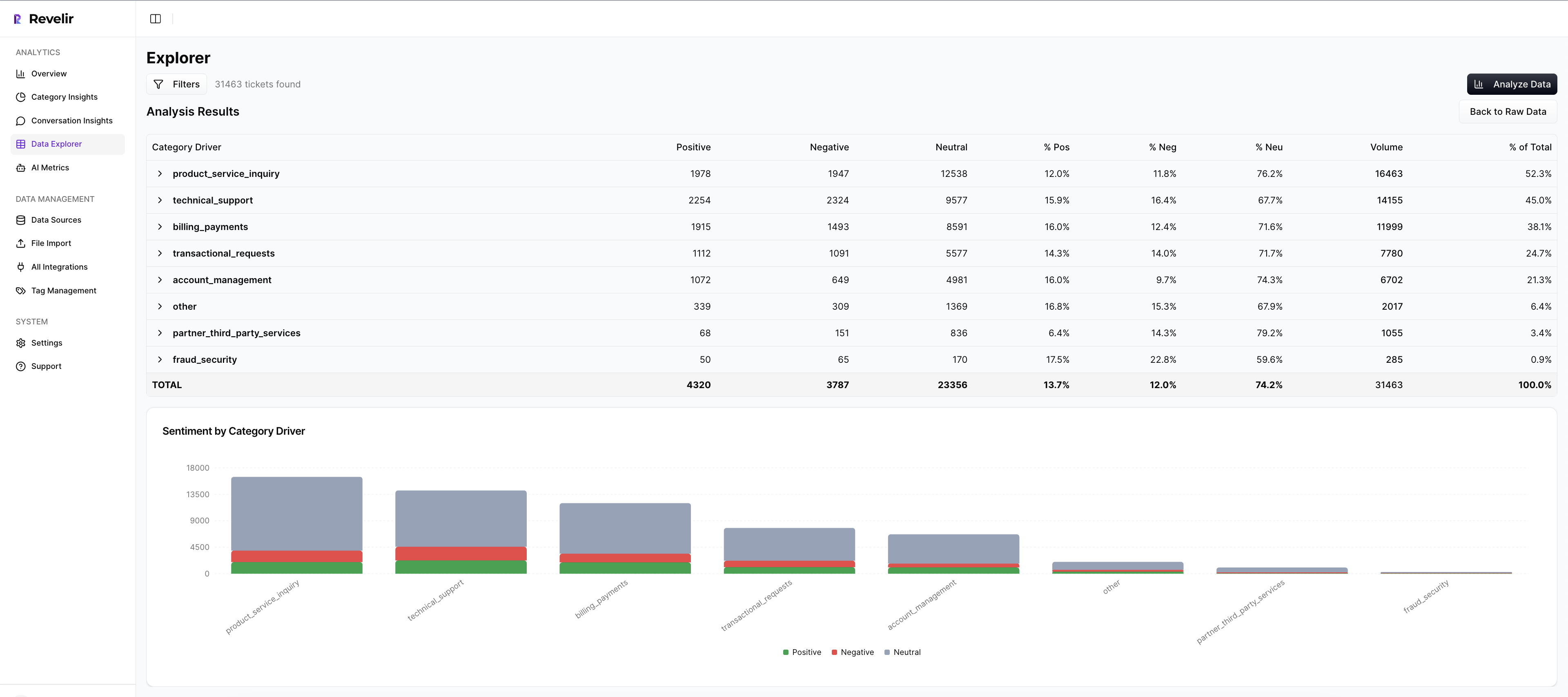
That “validate” step matters more than most teams admit. If you can’t click from a chart to the exact tickets behind it, you end up debating the system instead of debating priorities. Revelir keeps the evidence attached by default, which is exactly what builds trust outside the support org.
Core Revelir capabilities that show up in day-to-day work:
- Full-coverage processing of conversations (no sampling)
- Metrics and enrichment like Sentiment and Churn Risk
- Drivers and tags you can pivot on to find root causes
- Evidence-backed traceability to the original conversation context
- Analytics workflows that let you filter, group, and drill into examples
- API export of metrics so teams can use the outputs in their existing reporting
- Custom metrics and taxonomy so you can define what matters to your business and apply it consistently
And yes, this is where some teams get surprised. They think they need “better dashboards.” What they actually need is fewer meetings where nobody trusts the dashboard.
Comprehensive Feature And Capability Grid
This checklist is the fastest way to align requirements. It’s not about who has more boxes checked, it’s about which boxes you care about.

If you’re evaluating both platforms seriously, you’ll probably want to see Revelir on your own ticket history and see SupportLogic in the context of your QA and coaching process. That’s where the fit becomes obvious.
| Capability | Revelir AI | SupportLogic | Notes |
|---|---|---|---|
| Coverage scope | Processes 100% of ingested tickets (no sampling) | Aggregates and analyzes support data for predictive signals (SupportLogic Data Cloud) | Different philosophies: full-coverage analytics vs. predictive SX |
| Omnichannel ingestion | Import past tickets or connect helpdesk data | Multi-source support data via Data Cloud (SupportLogic Data Cloud) | Confirm specific systems in scoping |
| Automated tagging/theming | AI tagging and structured metrics | Conversation signals and analysis (SupportLogic Data Cloud) | Revelir emphasizes human-aligned taxonomy |
| Sentiment analysis | ✓ | ✓ (SupportLogic Data Cloud) | Both support sentiment analysis |
| Churn risk detection | ✓ (Churn Risk metric) | ✓ (predictive churn risk positioning) (SupportLogic Data Cloud) | SupportLogic focuses on proactive intervention |
| Driver/root cause rollups | ✓ (driver-based analysis workflows) | Positioned around proactive signals and conversation insights (SupportLogic Data Cloud) | Different emphasis: analysis workflows vs. ops outcomes |
| Evidence-backed traceability | ✓ (links to source tickets and quotes) | Not positioned around audit-traceable rollups (SupportLogic Data Cloud) | Auditability vs. operational guidance |
| QA automation | ✗ | ✓ (AutoQA positioning) (SupportLogic Data Cloud) | SupportLogic strength area |
| Coaching workflows | ✗ | ✓ (coaching and operational signals) (SupportLogic Data Cloud) | SupportLogic strength area |
| Agent assist / RAG answers | ✗ | ✓ (precision RAG with citations) (SupportLogic Precision RAG Event) | SupportLogic strength area |
| Knowledge access focus | Not a core focus | Discussed in knowledge access context (SupportLogic x NICE Blog) | Validate how it fits your workflows |
| Data refresh cadence | Ongoing processing for imported data | Raw about 6 hours; UI about 24 hours (SupportLogic Data Cloud) | Plan stakeholder expectations |
| API/data export | ✓ (API export for metrics) | Data foundation via Data Cloud (SupportLogic Data Cloud) | Plan for downstream reporting |
| Pricing transparency | Not publicly listed | Custom/quote-based; no public list prices (SupportLogic Data Cloud) | Budgeting requires vendor conversations |
If you want to see how Revelir fits your exact workflow, the clean next step is to See how Revelir AI works with your own ticket history and the questions your leaders already ask.
Best‑Fit Use Cases And Getting Started
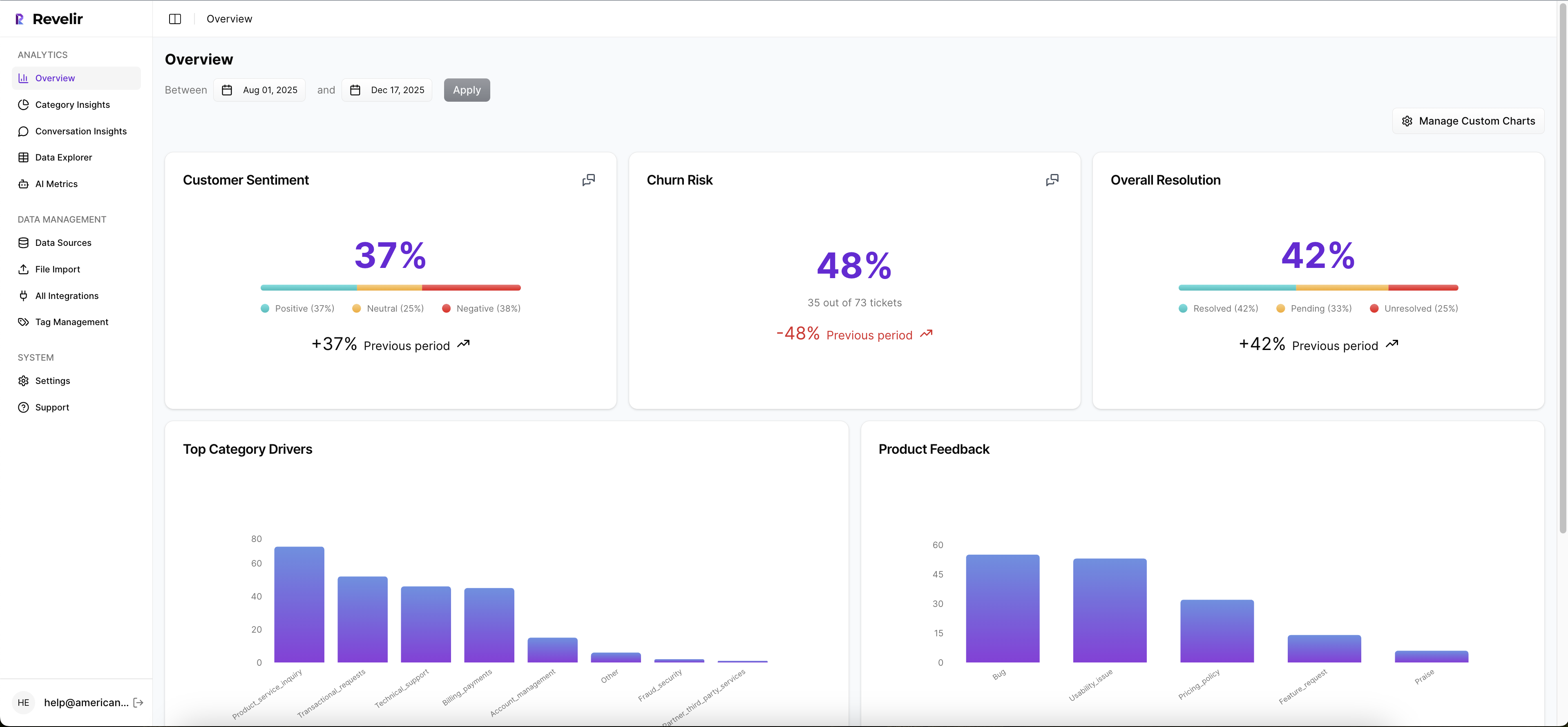
Revelir is usually the right call when product and CX need credible insight fast, and when you’re tired of sampling, arguing, and re-litigating what customers “really mean.” It’s built for the organizations that want a measurement layer, not another meeting.
SupportLogic is usually the right call when support operations is trying to run a scaled QA program, improve coaching consistency, and reduce escalations with proactive signals and assist workflows (SupportLogic Data Cloud; SupportLogic Precision RAG Event).
A simple way to decide is to picture the first 30 days.
If you’re going to spend the first 30 days designing scorecards, aligning QA criteria, and mapping coaching workflows, SupportLogic will feel aligned. If you’re going to spend the first 30 days answering “what’s driving negative sentiment” and “which issues hit enterprise accounts,” Revelir will feel aligned.
And you can be practical about it:
- Choose SupportLogic when QA automation and agent assist are primary outcomes.
- Choose Revelir when evidence-backed analytics and cross-functional trust are primary outcomes.
- Choose both only if you have the budget and the organizational maturity to run two programs without overlap confusion.
Conclusion: Picking The Tool You’ll Still Trust In Six Months
Revelir AI and SupportLogic can both create value, but they create it in different ways. SupportLogic is oriented around proactive support experience operations, AutoQA, coaching, and assist, backed by a managed data layer with documented refresh cadences (SupportLogic Data Cloud; SupportLogic Precision RAG Event). Revelir is oriented around evidence-backed metrics across 100% of conversations, so product and CX can make decisions without debating whether the data is real.
If you’re evaluating this for your team and want to pressure-test the “show me the tickets” workflow, Learn More and run your top three executive questions through the platform. If you’re ready to see how the drill-down validation works end to end, Get started with Revelir AI (Webflow).
The cleanest next step is simple: write down the first five questions your leadership team will ask when sentiment dips or churn risk spikes, then choose the platform that answers those questions with the least rework and the most trust.
Frequently Asked Questions
How do I analyze customer support conversations?
To analyze customer support conversations effectively, start by gathering data from your support interactions. You can use Revelir AI to turn these conversations into structured metrics, allowing you to identify trends and areas for improvement. Once you have your data, look for patterns in customer sentiment and feedback. This will help you understand what issues are most pressing for your customers and how your team can address them. Regularly reviewing these insights can lead to better decision-making and improved customer experiences.
What if I need to present support data to stakeholders?
If you need to present support data to stakeholders, Revelir AI is designed to help you with that. Start by organizing your findings into clear, structured metrics that highlight key insights from your support conversations. You can create a narrative around these metrics, focusing on the most impactful data points. Be prepared to answer questions by drilling into specific conversations that illustrate your points. This approach not only supports your claims with evidence but also makes your presentation more engaging and informative.
Can I track negative sentiment trends over time?
Yes, you can track negative sentiment trends over time using Revelir AI. Begin by collecting data from your support interactions and analyzing it for sentiment. Look for recurring themes or issues that lead to negative feedback. By regularly monitoring this data, you can identify trends and take proactive steps to address the root causes of dissatisfaction. This ongoing analysis can help you improve your support strategies and enhance customer satisfaction in the long run.
When should I pivot my support strategy?
You should consider pivoting your support strategy when you notice consistent negative feedback or declining satisfaction scores. Use Revelir AI to analyze your support conversations for patterns that indicate underlying issues. If you find that certain topics frequently lead to frustration, it may be time to adjust your approach. Additionally, if your metrics show a drop in customer engagement or an increase in escalations, this is a clear sign that a change is needed. Regularly reviewing your data can help you stay ahead of potential issues.
Why does structured data matter in support?
Structured data is crucial in support because it allows you to analyze and interpret information more effectively. With Revelir AI, you can turn unstructured support conversations into organized metrics that provide clear insights into customer behavior and sentiment. This structured approach helps you identify trends, measure performance, and make data-driven decisions. Ultimately, having structured data enables your team to respond more effectively to customer needs and improve overall service quality.