

Most churn models built off support tickets quietly assume the labels are solid. They aren’t. Half the “signals” are proxies, someone vented, an agent summarized loosely, renewal happened months later, so your model learns a fuzzy story and shouts with confidence. Then CSMs tune it out. Not because they’re stubborn. Because the alerts don’t hold up.
Here’s the shift: treat ticket-derived labels as weak hints, quantify the noise, and train like you meant to live with ambiguity from day one. When you do, you get fewer, better alerts. Scores that CSMs trust. And a paper trail to calm the “show me an example” challenge in the room that actually funds the work.
Key Takeaways:
- Treat ticket churn labels as weak signals, not truth, and measure their noise
- Audit labels by source and driver; document ambiguous patterns as negatives
- Quantify costs of false positives; optimize for precision at the top of the queue
- Use weak supervision: labeling functions + label model → probabilistic labels
- Train multi-task (churn, sentiment, effort), then calibrate and route by confidence
- Keep evidence visible and drillable so leaders trust the scores
Ready to skip the theory and see it with real tickets? See How Revelir AI Works.
Stop Treating Ticket-Derived Churn Labels As Ground Truth
Ticket-derived churn labels are weak, biased proxies that should be treated probabilistically, not as ground truth. Each signal, explicit churn mention, agent summaries, eventual renewal, carries different failure modes and timing gaps. The fix starts by cataloging noise sources and quantifying how each skews precision and recall on your alerts.
The noisy reality behind ticket churn labels
Labels sourced from conversations are messy because they encode interpretation, timing, and context, not just outcome. An “I’m going to cancel” rant might fade after a credit is issued; an agent summary could miss nuance; renewal records can lag weeks, masking the real driver. It’s usually a blend, and nobody’s checking consistency across sources quarter to quarter.
When you treat these as truth, you hard-code bias. Models overfit on anger words, underweight context like fixes already shipped, and trigger outreach that feels tone‑deaf. The smarter path is to mark each source as a weak vote with known error rates. Then let a label model reconcile conflict instead of pretending certainty exists.
If you need a grounding frame, think in terms of stochastic labels. A label weakening approach models label noise explicitly, acknowledging that each observation is a noisy draw from the latent true intent. That mindset reduces overconfident misfires.
What signals from conversations are actually ambiguous?
Churn mention is not churn. Anger is not intent. A discount request isn’t a decision. Write this down. Codify patterns like venting after a fix, sticker shock on new pricing, and “missing feature” gaps that resolve a week later. Same thing with sarcasm and mixed threads that weave two unrelated issues into one transcript.
You’ll use these ambiguous cases as hard negatives during audits and rule design. They teach your system the distinction between emotion, friction, and real attrition risk. We’ve seen teams cut half their false positives by simply flagging “thank-you after resolution,” “credit applied,” or “agent escalated policy exception” as context that suppresses a churn vote.
Don’t overcomplicate it at the start. Define 10-15 patterns, collect representative examples, and keep them visible in an audit log. Your models, and your CSMs, will thank you.
Find And Quantify The Noise Before You Train
You quantify label noise by inventorying sources, auditing samples, and measuring disagreement across strata (drivers, channels, segments). Start with small, structured audits to estimate mislabel rates and identify ambiguous clusters. Then feed those patterns into heuristics and abstain logic so your training set stops lying to you.
Where ticket churn labels come from and how they go wrong
List your sources: explicit churn mentions, agent notes, helpdesk tags, “renewal outcome” fields pulled from CRM. Each has distinct failure modes. Sarcasm and hyperbole warp mention-based labels. Agent notes compress nuance. Renewal fields suffer from timing gaps and attribution errors. Policy appeasements masquerade as risk but resolve quickly.
Map those failure modes to examples. For each source, pull 50–100 tickets and estimate the error rate: what percent would a careful reviewer flip? Note the driver context, billing, onboarding, account access, because noise is rarely uniform. You’ll discover hotspots (billing language is spicy; onboarding is confusing, not quitting). Document these, because they become rule inputs.
A practical way to structure this is weak supervision. Labeling functions can vote “risk,” “not risk,” or “abstain,” and you let a label model weight them. The original weak supervision label model work shows how to estimate function accuracy and correlations from unlabeled data.
How do you audit label quality quickly?
Start with stratified sampling across channels and drivers so you capture variance. Two reviewers per ticket. Compute inter‑rater agreement on 100 tickets to gauge baseline ambiguity, then compare their adjudicated label to the original. That gives you a mislabel rate you can trust, not a gut feel.
Next, segment by driver and customer tier. Use a Data Explorer–style grouping to find clusters with high disagreement, billing disputes, onboarding confusion, feature requests. Click into a sample and write a short “rubric note” for each: what counted as churn intent, what didn’t, what demanded abstention. This becomes your living instruction set for reviewers and rules.
Keep it tight. One page, updated monthly. It’s a forcing function. And it keeps the model, the auditors, and the CSM team aligned on what “risk” actually means.
The Hidden Costs Of Training On Noisy Churn Labels
Noisy churn labels inflate false positives, waste CSM time, and erode trust in analytics. Each bad alert consumes review cycles, forces awkward outreach, and crowds out real risk. Optimize for precision at the top of the queue, not vanity accuracy, or you’ll watch adoption stall even as the ROC curve looks fine on paper.
False positives drain CSM time and credibility
Every misfire costs minutes. A review, a note in CRM, sometimes a customer touch that wasn’t needed. Multiply by hundreds a month and you’ve got hours of frustrating rework. Worse, leadership starts questioning the dashboard, not the process. You feel it in the tone of weekly reviews, more hedging, less conviction.
Precision at the top of the queue matters more than global accuracy. If the first 50 alerts are mostly right, humans lean in. If they’re coin flips, they’ll ignore even the good ones. Set your objective accordingly. Top‑K precision is the currency of trust. Everything else is comfort metrics.
We’ve all seen it. A pretty score without a path back to the evidence. One uncomfortable question, “show me two examples”, and momentum dies.
Let’s pretend we quantify the impact
Let’s pretend you handle 2,000 tickets a month. Your model flags 10% as high risk. Half are false positives. If each review and outreach costs eight minutes, that’s 13 hours on noise. If even 10% of those escalate internally, add another couple of hours of manager time and debate. Rework spreads.
If your alerts drive CSM outreach across 200 accounts per quarter, a 15% false‑positive rate at the top of the queue can sour relationships. People remember unnecessary “we’re concerned” emails. The cure isn’t more data, it’s calibrated precision, evidence links, and confidence thresholds that respect ambiguity. There’s solid evidence that noisy labels degrade reliability and downstream decision quality; see the overview on model robustness under label noise.
Still dealing with this manually and getting the side‑eye in reviews? Learn More.
What It Feels Like When Alerts Are Wrong
Bad alerts create busywork and awkward customer touches, and they push teams into defensive posture. CSMs get spammed, analysts get pulled into QA, and product loses patience. Fewer, better alerts with visible evidence and uncertainty cues change the mood. People relax when they can see the why.
Who pays the price when alerts misfire?
You do. CSMs triage noise while real risks wait. Analysts context‑switch to chase edge cases. Customers receive unnecessary check‑ins that feel off. Internally, teams start hedging their recommendations, because nobody wants to anchor a plan to a number they can’t defend. It’s usually not the model; it’s the label and the thresholds.
Here’s a three‑minute story you’ve lived. Three weeks from renewal, an alert fires “high risk” after a heated refund dispute. The fix shipped yesterday. Sentiment recovered. You still spent 15 minutes validating context and writing a note. Ten times a week it becomes a tax. Better thresholds, plus visible evidence, would have suppressed it.
Why uncertainty signals calm the noise
A single score forces a binary decision, escalate or ignore. A calibrated probability with an interval invites routing logic. Low confidence goes to analyst review. Medium goes to watchlists. High goes to CSMs with quotes attached. That simple split restores trust because it acknowledges reality, not every case is clear.
This is where confidence bands earn their keep. They’re not nice‑to‑have; they’re protection. And they give leaders language to set expectations. “We target 80% precision for the top 50 alerts; the rest are monitored.” That tone changes adoption.
Build A Robust Pipeline With Weak Supervision And Multi Task Learning
A robust pipeline treats labels as votes with confidence, not facts, and layers weak supervision with multi‑task training and calibration. Design labeling functions, combine them with a label model, train a multi‑task classifier, then calibrate and route by confidence. The methodology is boring on purpose. And that’s why it works.
Design labeling functions for support tickets
Start with domain heuristics that vote risk, not risk, or abstain. Build dictionaries for churn language with negation (not, unless, until), pattern matchers for effort cues (multiple transfers, reauthentication loops), and policy mentions (pricing changes). Add counter‑examples like gratitude after resolution, or “thanks, this fixed it” that suppress risk.
Measure coverage, conflict, and precision per function. You want high‑precision anchors (e.g., “churn + contract + cancelation date”) and broad‑coverage context functions (e.g., “billing + high effort + no resolution”). Track where rules collide. That’s signal you’ll hand to the label model to estimate function accuracy.
Don’t be precious. Labeling functions are drafts. You’ll edit them as your audit log grows.
Combine heuristics with a label model to produce training labels
Use a label model to estimate the accuracy and correlation of your functions and produce probabilistic labels. Down‑weight highly correlated signals (e.g., two billing vocab lists), penalize conflict, and keep an abstain path for ambiguous tickets. Store per‑ticket label probabilities so you can filter low‑quality labels before training.
This matters because you’re moving from hard, error‑prone labels to distributions that reflect what you actually know. Techniques like meta label correction for weak supervision can further adjust for systematic bias during training. The goal isn’t perfection. It’s honesty about uncertainty in the data.
Keep an eye on coverage. If 30% of tickets are consistently abstained, you have a discovery problem. Add or refine functions.
Train a multi task classifier with sentiment and effort as auxiliaries
Jointly predict churn, sentiment, and effort. Auxiliary tasks regularize shared text features and reduce overfitting to noisy churn labels. Anger spikes? Fine. But if effort is low and resolution is fast, the model learns to discount raw emotion. Same thing with ticket reopen and “resolved with credit” cues.
Handle class imbalance with class reweighting or focal loss. Use selective pseudo‑labeling: only promote examples above a confidence threshold from the label model into your supervised head. Monitor auxiliary task performance; if sentiment or effort drifts by driver or channel, that’s a canary for taxonomy changes or product shifts.
This isn’t over‑engineering. It’s how you keep the model grounded in reality instead of a few spicy phrases.
Calibrate scores and set thresholds for actionability
Calibrate probabilities on a clean validation slice per cohort (driver, segment, channel) using temperature scaling or isotonic regression. Then set routing thresholds that prioritize precision at the top of the queue. Low confidence goes to analyst review. Medium becomes a watchlist. High triggers CSM outreach, with evidence quotes attached.
Compute prediction intervals by cohort so reviewers see uncertainty in context. Report precision@K weekly for the top slice. If it dips, adjust thresholds, retrain with updated audits, or revise labeling functions. This is operational discipline, not just model tuning.
If you want a practical overview of operationalizing weak supervision, this guide on generating labels with weak supervision covers common pitfalls and workflows.
How Revelir AI Supports Auditable Churn Scoring And CSM Workflows
Revelir gives you evidence‑backed metrics from 100% of your support conversations and keeps the source quotes one click away. You can filter by churn risk, group by drivers, and drill into transcripts in seconds. That traceability plugs the trust gap. It’s the difference between “a score” and “a score I can defend.”
Evidence backed traceability with full coverage
Revelir processes 100% of conversations, no sampling, and links every metric to its source transcript. Anywhere you see a count, you can click to open the exact tickets, read the AI summary, and scan the quotes behind the classification. When someone asks “why was this flagged,” you have the receipt. Not a stitched spreadsheet, real evidence.
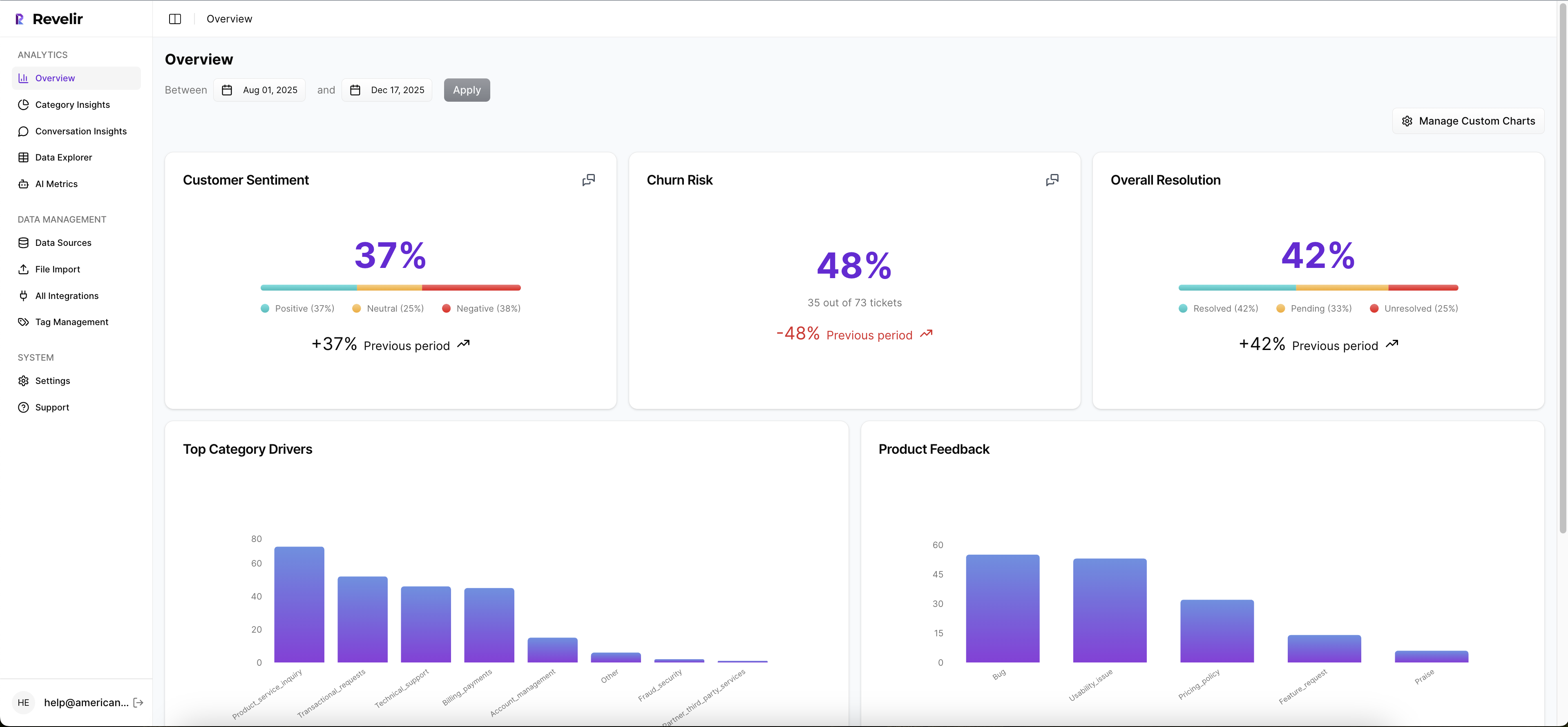
Full coverage matters for training too. When you pivot by driver or canonical tag, you’re looking at the whole population, not a biased slice. You stop debating representativeness and start tuning thresholds for precision at the top of the queue. Less noise. More trust in the first 50 alerts.
How do you validate a flag in seconds?
Open Data Explorer, filter by Churn Risk, then group by driver or canonical tag to spot patterns. See a weird spike in Billing? Click the count to jump straight into Conversation Insights. Read the transcript, check the AI summary, confirm effort, sentiment, and tags. If it’s a false positive pattern, you’ve got examples ready to refine your labeling functions.

This “macro to micro” loop keeps your label audit tight. Analysts validate quickly. CSMs can sanity‑check before outreach without hopping tools. And when leadership asks for proof, it’s one click away, no theatrics, no delays.
Align signals with drivers and canonical tags leaders understand
Use raw tags for discovery. Use canonical tags and drivers for clean reporting. Revelir remembers your mappings as you refine them, so future tickets roll up correctly. That means churn, sentiment, and effort signals present cleanly in leadership reviews and remain comparable month to month, even as language and issues evolve.
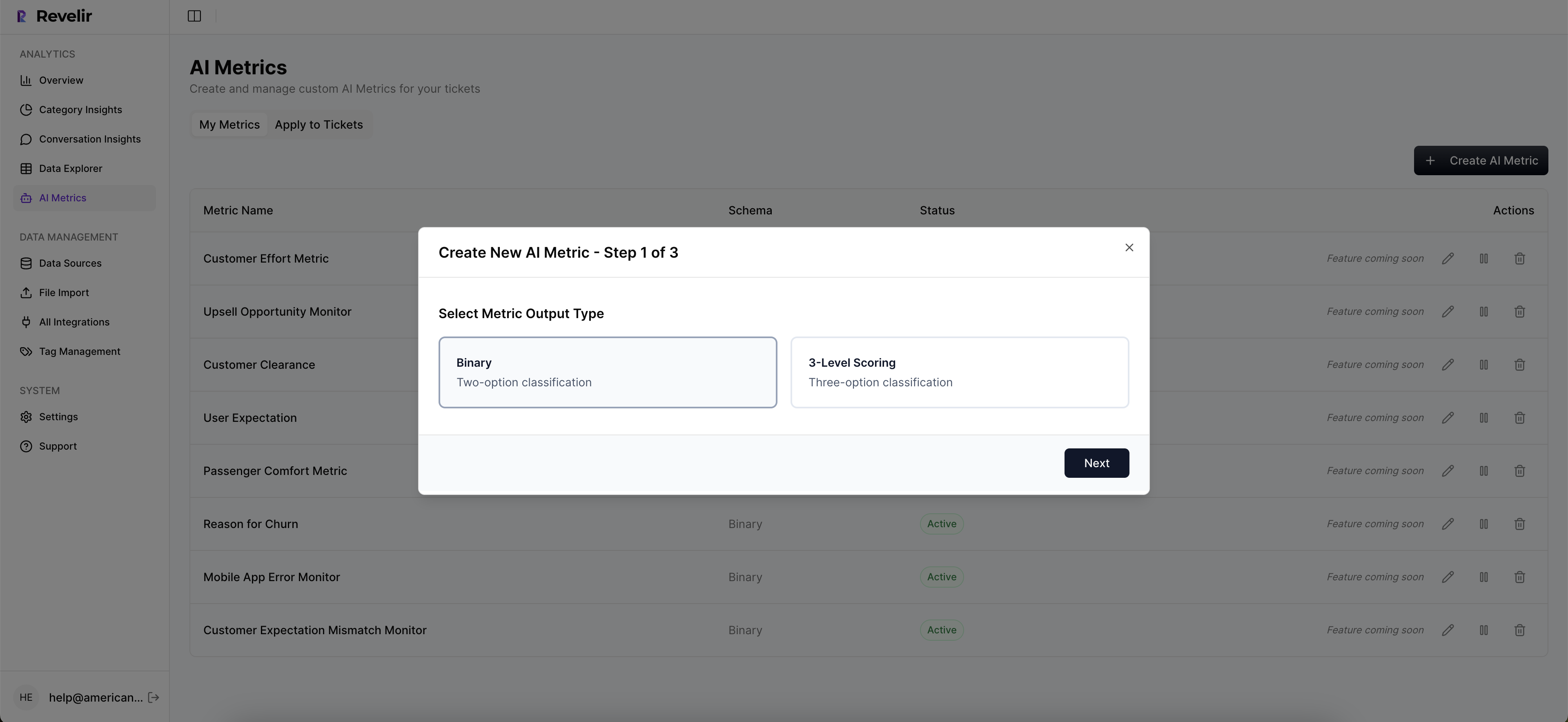
The payoff is twofold: your model learns on a stable taxonomy, and your reports speak the language of decision‑makers. Less translation. Faster decisions.
Close the loop with saved views and label refresh cadence
Create saved views for high‑risk cohorts (e.g., Enterprise + Billing). Refresh labels as new tickets arrive via Zendesk integration or CSV uploads. Re‑run Analyze Data to measure the impact of fixes and re‑tune thresholds. Export aggregated metrics into your BI if you need to compare against renewals or product telemetry.
This is the cadence that turns insights into action: steady audits, visible evidence, and thresholds tuned for top‑of‑queue precision. Revelir makes it the default way of working, not a special project.
Want to operationalize this with your own data this week? Get Started With Revelir AI.
Conclusion
Ticket‑based churn labels are weak signals. Treat them that way. When you catalog noise, combine multiple weak votes, train with multi‑task support, and calibrate for actionability, your top‑of‑queue alerts get quiet and right. Then keep the evidence visible. That’s how CSMs trust the scores, product trusts the patterns, and leadership funds the work.
Frequently Asked Questions
How do I set up Revelir AI for my support tickets?
To set up Revelir AI for your support tickets, start by connecting your helpdesk system, like Zendesk. This allows Revelir to automatically ingest your historical tickets and ongoing updates. If you prefer, you can also upload a CSV file of your tickets. Once your data is in, Revelir will process it and apply AI metrics like sentiment and churn risk. After that, you can use the Data Explorer to filter and analyze your ticket data efficiently.
What if I want to customize metrics in Revelir AI?
You can customize metrics in Revelir AI by defining your own AI metrics that align with your business needs. For example, you might want to track 'Upsell Opportunity' or 'Reason for Churn.' Simply specify the possible values for these metrics, and Revelir will apply them consistently across your conversations. This customization helps you gain insights that are directly relevant to your team’s objectives.
When should I validate insights from Revelir AI?
You should validate insights from Revelir AI whenever you notice significant trends or anomalies in your data. For instance, if you see a spike in churn risk, click into the Conversation Insights to review the underlying tickets. This allows you to confirm that the AI classifications match the actual conversations, ensuring that your decisions are based on accurate data.
Why does Revelir AI focus on 100% conversation coverage?
Revelir AI focuses on 100% conversation coverage to eliminate sampling bias and ensure that no critical signals are missed. By analyzing every ticket, Revelir provides a complete view of customer sentiment, churn risk, and other metrics. This comprehensive approach allows teams to make informed decisions based on reliable data, rather than relying on partial insights that can lead to misinterpretation.
Can I track customer effort using Revelir AI?
Yes, you can track customer effort using Revelir AI. The platform assigns a Customer Effort Metric (CEM) based on the conversational cues present in your tickets. This metric categorizes conversations as high or low effort, helping you identify workflows that create friction. By monitoring customer effort, you can pinpoint areas for improvement and enhance the overall customer experience.