

Most CX teams have a governance deck. Fewer have a working set of guardrails in the queue. That gap is where risk lives. Policies don’t protect customers; operational boundaries do. Who approves what. Where AI can suggest only. When it may act. And how it all gets audited without slowing the team to a crawl.
Here’s the uncomfortable part. Governance fails quietly. Not with a breach, but with a week of slightly off decisions nobody’s checking. Same thing with refunds, cancellations, access resets, tiny drifts compound. If you want trust from leadership and regulators, design human-in-the-loop as day-to-day decisions, not a policy doc.
Key Takeaways:
- Treat HITL as concrete approval gates, evidence requirements, and override logs
- Risk-rate autonomy by workflow and driver; expand only after measured stability
- Measure 100% of conversations; sample QA intelligently to reduce bias
- Tie metrics to quotes so leaders can inspect the “why” in one click
- Track precision/recall by driver and publish SLOs tied to outcomes
- Use an autonomy matrix and saved views to catch drift before it escalates
Why Compliance Checklists Fail CX AI Governance
Compliance checklists fail CX AI governance because they don’t control daily decisions. The real guardrails are the boundaries in your tools and runbooks that shape what happens in the queue. Make approval paths, sampling, and escalations explicit, testable, and visible so auditors and executives can inspect decisions without slowing the team.
AI Governance Lives In Daily Decisions, Not Policy Pages
Governance isn’t a PDF; it’s how tickets move. If AI can suggest a reply for password resets but needs human approval on refunds above a threshold, that boundary should live inside the workflow. Not “somewhere in Confluence.” You want managers to see, in real time, where the AI is helping, where humans are deciding, and how exceptions are handled.
It’s usually the invisible parts that break trust. Unclear approvals. Friction to escalate. Ambiguity around “suggest only” vs “auto act.” So write the runbook like a circuit diagram and embed it into the tools the team uses daily. When sampling and escalation are concrete, you can test the system instead of debating it.
Do the boring work up front:
- Map workflows to autonomy modes (suggest, approve, auto)
- Define who approves which thresholds
- Specify evidence required with each decision
- Log overrides with reasons for audit and learning
For more on why pairing human judgment with structured controls matters, see this view of human-guided AI in CX.
What Is Human-In-The-Loop For CX, Really?
Human-in-the-loop is an operational gate system. For each workflow, refunds, cancellations, access resets, specify who approves which thresholds, what evidence must be attached, and how overrides are recorded. That’s it. No slogans. Just clear gates, clear owners, and a record you can defend.
Design for 100% visibility. You should be able to click any metric and see the conversation that justified the path taken. When an error slips through, the evidence trail shows whether the gate failed, the classification drifted, or the policy lagged. That clarity reduces finger-pointing and accelerates fixes.
You’re not trying to banish errors. You’re building a system that makes the errors legible. When the gates work, managers trust the autonomy you do allow. And agents don’t feel like they’re defending a black box they can’t explain.
Why Most Teams Underestimate Decision Boundaries
Teams often set one-size-fits-all rules and call it governance. That’s a miss. AI output quality varies by use case, season, and data drift. It’s usually stable on repetitive, low-risk replies. Less so on policy-sensitive actions with changing thresholds. So risk-rate boundaries by scenario, not by tool.
Start conservative on anything with financial or compliance impact. Expand autonomy only after evidence shows stable precision and recall by driver and segment. Write down your promotion criteria. “When refunds under $50 maintain 95% precision for four weeks, move to auto act for non-enterprise accounts.” Same thing with churn-risk outreach or de-provisioning.
Codify and communicate these rules in the tools, not just the deck. Then you can change them as the model improves, without changing how you prove it’s safe.
Want an early look at how this works in practice? See it end-to-end: See how Revelir AI works.
The Root Cause Is Operational Drift, Not Model Hype
The root cause isn’t the model’s headline accuracy. It’s operational drift: policy changes, seasonal spikes, agent adaptation, and data shifts that nudge systems off course. Governance works when metrics roll up to quotes and quotes inform policy updates, closing the loop without a dozen meetings.

What Traditional Approaches Miss In Live Queues
Governance decks assume static behavior. Live queues don’t. Policies change on Monday, a spike hits Wednesday, and the phrasing customers use shifts by Friday. If you can’t drill from trend to transcript, debates resurface and fixes stall. You need a loop where aggregates lead to examples, and examples update rules.
Start top-down, then validate bottom-up. Aggregate by driver or canonical tag to see where negative sentiment or high effort concentrates. Then read a handful of tickets in those clusters. Do the examples match the metric? If not, adjust tags, drivers, or thresholds. That cadence keeps AI and policy aligned as reality shifts.
There’s a reason mature teams favor human, AI pairing over one-and-done automation. The most effective patterns reflect human, AI collaboration models that adapt to context, not just accuracy scores.
The Hidden Complexity Of Autonomy Modes Across Workflows
A reply suggestion for a password reset is not the same as issuing a refund. Different risk, different consequences. Build an autonomy matrix by workflow, risk tier, and customer segment. For each cell, define the mode (suggest, approve, auto), who approves, what evidence is required, and the audit notes you expect.
Pair that with saved views that surface outliers by driver or segment. Managers should see drift early, “refund exceptions rising in APAC, associated with shipping delays”, not after escalation volume grows. That’s how you shrink review effort while expanding autonomy where it’s safe.
As you learn, update the matrix. Don’t let it calcify. Decisions evolve with the business.
When Traceability Is Missing, Trust Evaporates
Leaders ask to see an example. If you can’t click from a chart to the exact conversation, initiatives pause. That’s not stubbornness; it’s good judgment. Traceability isn’t a nice-to-have, it’s how you defend decisions and keep autonomy.
Preserve an evidence chain for every metric and classification. Aggregates roll up to quotes. Quotes link back to tickets. Overrides capture who, why, and when. When someone asks “Why did we auto-approve this refund?”, you can show the transcript, the tags, and the threshold in two clicks. Trust returns quickly.
Revelir AI is built around this standard: metrics that are verifiable and anchored to source conversations so debates give way to decisions.
The Cost Of Unbounded Autonomy In CX
Unbounded autonomy looks efficient until the bill arrives. Small error rates compound into rework, escalations, and churn risk. If you can’t quantify the cost by driver and segment, it hides in the noise. Measure 100% of conversations. Then design QA so effort drops without bias sneaking back in.
Time Lost To Rework And Escalations
Let’s pretend your AI misroutes 3% of 20,000 monthly tickets. That’s 600 cases. If each correction takes six minutes across agents and managers, you burn 60 hours a month. That’s before you count the escalations those errors trigger and the morale hit from avoidable rework.
It’s never just the minutes. It’s the interruption cost, the context switching, the Slack threads, the “can you check this one” DMs. Multiply that across teams and quarters, and the math gets painful. You need to choose where autonomy pays and where approval is cheaper than cleanup.
Focus fixes where the waste concentrates:
- High-volume, medium-risk workflows with stable phrasing
- Drivers with predictable thresholds (e.g., shipping delays)
- Segments where pattern stability is proven
Interjection: Don’t guess. Measure it.
The Risk Of Sampling Bias In QA
Spot-checking 50 tickets feels rigorous. It isn’t. Spikes often hide in specific drivers or customer cohorts. If your sample skips those clusters, you miss emerging risk until it’s expensive. Sampling bias creates false confidence, and governance drifts until reality bites.
Insist on 100% coverage for measurement, then design QA sampling to be stratified by driver and severity. Pull more examples from high-risk, high-value segments and newly changed policies. Rotate the audit cadence so edge cases surface without burning hours. This is how you reduce effort without losing signal.
Ethics and bias aren’t abstract here; they’re operational. This lens from CallMiner on AI ethics in CX is useful context for designing reviews that are fair and effective.
How Do Small Errors Cascade Into Churn Risk?
A few wrong refund decisions for your highest-value customers can start a loop: negative sentiment rises, effort spikes, churn risk flags trip, CSMs mobilize, and you’re now spending budget to recover preventable mistakes. It’s a tax on growth.
Contain the loop early. Track precision and recall by driver, not just overall. Set confidence thresholds where autonomy drops to “suggest only” for sensitive scenarios. Provide clear override paths so agents can intervene quickly and log the why. Then watch recovery like a hawk.
If you do this well, small errors stay small. If you don’t, they become renewal problems.
Still doing this manually? There’s a faster way to quantify the risk and fix it before it spreads. Here’s a straight path to evidence-backed reviews: Learn More.
What It Feels Like When The Model Goes Off-Script
When the model drifts, it doesn’t send a memo. You feel it. Refunds spike. Confidence drops. Leaders ask for examples you can’t surface fast enough. The fix isn’t heroics; it’s better gates, rollback plans, and traceable evidence you can put on the screen in seconds.
The 3 A.M. Refund Storm You Did Not Forecast
A policy update shipped yesterday. Overnight, reply suggestions still quote last week’s thresholds. Agents follow the tool. Refunds spike. Finance pings you at dawn. You scramble to find examples, pull queries, and mute the behavior mid-shift. Stressful. Preventable.
This is where validation gates earn their keep. Before policy-sensitive changes go live, route a subset through approver mode and watch precision by driver. If drift shows up, roll back to “suggest only” with one click and publish the change log. If nobody’s checking, storms like this become monthly weather.
You want to move fast. Do it with brakes that work.
When Your Top Account Gets The Wrong Answer
Sales calls. A strategic customer received an incorrect de-provisioning policy. They want assurance it won’t happen again. You need traceable evidence of what happened, an override path that was executed, and a measurable guardrail that shows precision recovered before autonomy resumes.
Without that, you’re asking them to trust a black box during a renewal. With it, you show the transcript, the classification, the gate that caught it (or didn’t), and the remediation you deployed. Confidence returns because proof beats promises.
A Practical Framework For Human-In-The-Loop CX AI
A practical HITL framework for CX has four pillars: an autonomy matrix with decision boundaries, validation plus QA sampling that preserves coverage, explicit escalation paths with SLAs, and AI health metrics tied to outcomes. Keep it simple. Keep it visible. Iterate monthly.
Design An Autonomy Matrix With Decision Boundaries
Create a one-page autonomy matrix by workflow and risk tier. Define suggest-only, approve-required, and auto-act modes, along with who approves at each level. Add scoring rubrics, confidence thresholds, and required evidence fields so decisions are consistent and auditable.
Revisit the matrix monthly using metrics by driver. Expand autonomy only where precision and recall remain stable over time and segments. Write down promotion criteria (“95% precision for four weeks, no high-severity outliers”) so changes are predictable, not political. Agents relax when the rules are clear.
A good matrix is crisp:
- Workflows down the rows; risk tiers across columns
- Mode, approver, evidence, and SLA per cell
- Linked to saved views so managers monitor the right slices
Define AI Health Metrics And SLOs Tied To Outcomes
Governance needs numbers. Track precision and recall by driver, false-positive and false-negative rates, and data drift indicators. Connect them to business outcomes like churn-risk density and customer effort. Publish SLOs: minimum precision by driver, maximum drift allowed before autonomy is reduced.
Don’t hide these metrics. Put them where teams work. When everyone understands the thresholds and the trade-offs, they make better calls. And when a metric trips, the path is automatic: drop autonomy, open a review, confirm with examples, and then restore when stability returns.
For ongoing monitoring patterns, this overview on AI behavior monitoring in CX is a useful reference.
How Revelir AI Supports Governance You Can Trust
Revelir AI supports governance you can trust by turning 100% of your support conversations into evidence-backed metrics you can drill into instantly. It combines full-population analysis, transparent traceability, and a flexible tagging and metrics system so you can encode decision boundaries and adjust them with confidence.
Evidence-Backed Traceability For Every AI Decision
Revelir AI links every metric to the source conversation, summary, and tags. From an aggregate view, managers click straight into representative transcripts to verify why a decision made sense. That shortens debates during escalations and accelerates sign-off when policies change because proof is never more than a click away.
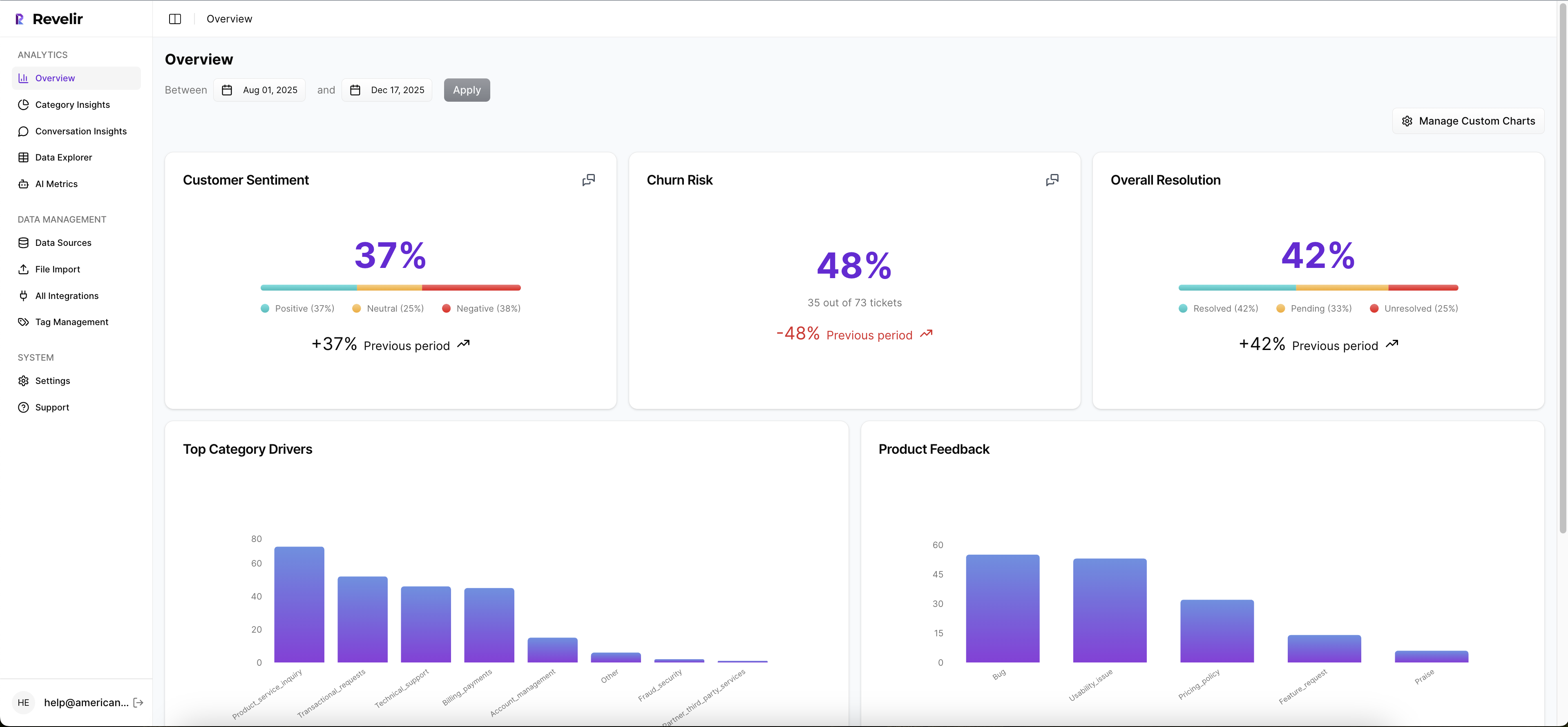


It also analyzes 100% of your conversations, no sampling, so your governance decisions are built on complete coverage. In Data Explorer, you group by drivers, canonical tags, sentiment, churn risk, or custom AI Metrics to see exactly where risk concentrates. Then you sample human QA from those clusters, preserving signal while reducing review effort. Analyze Data guides those grouped insights, and Conversation Insights provides the per-ticket validation workflow.
Revelir AI’s hybrid tagging system keeps the taxonomy clean and leadership-ready. AI-generated raw tags surface granular patterns; you roll them up into canonical tags and drivers that match your language. You can also define custom AI Metrics to label operational risk states or policy-sensitive categories, which effectively codifies your autonomy matrix in reporting. As mappings mature, analyses stay clear and aligned with how your organization talks about issues.
When behavior shifts after a policy change, Revelir AI makes investigation quick. Pivot by driver, segment, or metric, open a handful of conversations, and decide whether to pull autonomy back to “suggest only” while you adjust tags or thresholds. Then watch precision and recall recover before expanding autonomy again. It’s the flywheel your governance runbook needs: measure → validate → adjust → verify.
Specific capabilities that enable this approach:
- Full-coverage processing across all uploaded or ingested tickets
- Data Explorer and Analyze Data for grouped analysis by driver or category
- Conversation Insights for transcript-level evidence and auditability
- Hybrid tagging (raw + canonical) and drivers to stabilize reporting
- Custom AI Metrics to label the risk states that matter to your business
Ready to move from policy pages to provable governance? Let’s make the evidence visible in your own data. Get Started With Revelir AI.
Conclusion
Checklists don’t govern your queue. Operational boundaries do. When you make HITL concrete, autonomy matrices, evidence requirements, override logs, and tie every metric to quotes, you shift from black-box anxiety to defensible speed. You’ll expand autonomy where it’s safe, shrink it when drift appears, and prove decisions with one click.
That’s how CX leaders sleep through the night. Not because errors vanish, but because the system makes them visible, fixable, and rare.
Frequently Asked Questions
How do I set up Revelir AI with my helpdesk?
To set up Revelir AI with your helpdesk, start by connecting your support platform, like Zendesk. Once connected, Revelir will automatically ingest historical tickets and ongoing updates, including full message transcripts and metadata. After the connection, verify that the ticket counts and date ranges match your expectations. This setup typically takes just a few minutes and allows you to start analyzing your support data immediately.
What if I want to analyze customer sentiment trends?
You can analyze customer sentiment trends using Revelir AI's Data Explorer. Start by filtering your dataset by sentiment, then run an analysis grouped by category drivers. This will help you identify which areas are driving negative sentiment. Additionally, you can click into specific segments to view the underlying conversations, allowing you to validate the patterns and make informed decisions based on real customer feedback.
Can I create custom metrics in Revelir AI?
Yes, you can create custom metrics in Revelir AI that align with your business needs. For instance, you could define metrics like 'Customer Effort' or 'Reason for Churn.' Once defined, Revelir will score each conversation based on these custom metrics, allowing you to analyze specific aspects of customer interactions. This flexibility helps ensure that the insights you gain are relevant and actionable for your team.
When should I validate my findings with Conversation Insights?
You should validate your findings with Conversation Insights whenever you notice significant trends or anomalies in your data. For example, if you identify a spike in negative sentiment from a specific category, click into the Conversation Insights to review the actual tickets behind that metric. This helps ensure that the AI-generated insights align with the real customer experiences, providing you with the confidence to act on the data.
Why does my team need full coverage of support conversations?
Full coverage of support conversations is crucial because it eliminates bias and ensures that you capture all relevant customer signals. When you analyze 100% of your tickets, you can identify early signs of churn risk and operational issues that might otherwise go unnoticed. Revelir AI processes all conversations automatically, allowing you to make data-driven decisions based on complete insights rather than relying on sampling, which can lead to missed patterns.